
Product line · live
Real OS.
The back office for a real estate agent: deals, people, buyers and the year's numbers on one screen, read from the tools you already use.
Real OS
The office behind the website.
Today
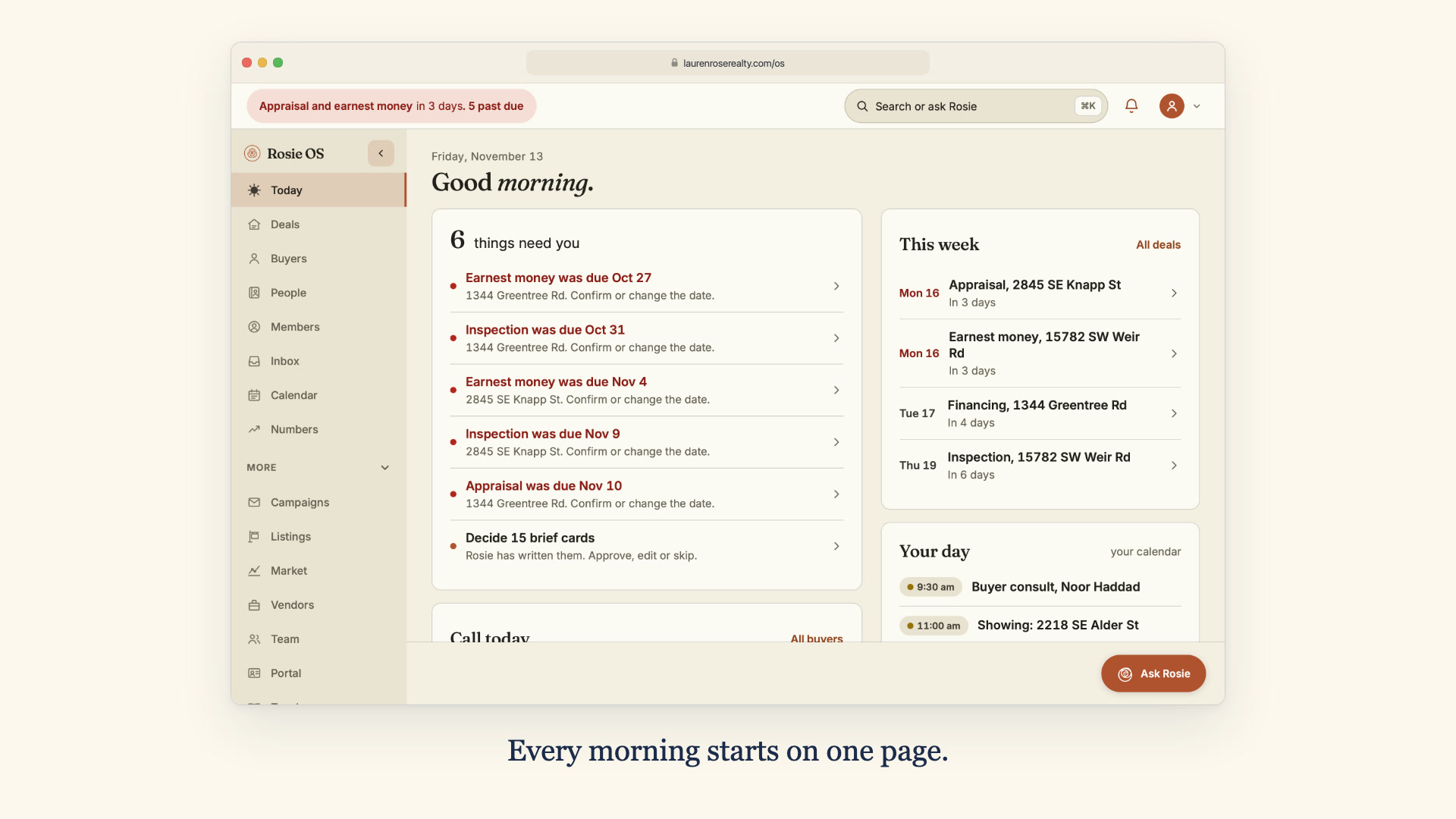
One page that opens on what needs the agent, past-due money dates first, then the brief to decide, the next seven days and the day's calendar. Every sentence it writes is built from the records when the page loads.
- Money dates for the next seven days
- Past-due dates, each a link to its deal
- Every sentence built from the records
Real OS
The office behind the website.
Deals
The transactions, read from the office's own deal sheet and never written back, with every deadline of a deal on one line and a checklist drawn from its Drive folders.
- Read from your sheet, never written back
- A renamed column stops the sync, not a deal
- Checklists from your own Drive folders
Real OS
The office behind the website.
Buyers
The CRM's buyers ranked by what they did on the website this week, homes viewed and saved, days they came back, how long since a call, with a panel that shows why each one scored where it did.
- Ranked by what they did on the site this week
- Homes viewed, homes saved, return visits
- Why this score, line by line
Real OS
The office behind the website.
Rosie in staff mode
An assistant who answers questions about the business from the records, checks the asker's seat first, says when each figure was true, and never sends anything.
- Answers from the records, with the time they were true
- Inside your seat, or she says so
- She suggests, you press
Watch it work
Forty seconds, desk and phone.
Rosie OS on sample data: every person, deal and message in the film is invented, and every screen is the real software.


The breakdown
What Real OS does.
Real OS is the office behind an agent's website: the first screen of the morning, on a desk or on a phone, built on the tools the office already runs rather than in place of them.
I build it for real estate agents, one office at a time. Lauren Rose Homes runs it as Rosie OS: Today, Deals, Buyers, People, Members, Numbers, Inbox and an assistant named Rosie, on a desk and in one hand on a phone. It does not replace the CRM or the deal sheet. It reads them, and puts what they say where the agent looks first.
Today
One page that opens on what needs the agent, past-due money dates first, then the brief to decide, the next seven days and the day's calendar. Every sentence it writes is built from the records when the page loads.
Deals
The transactions, read from the office's own deal sheet and never written back, with every deadline of a deal on one line and a checklist drawn from its Drive folders.
Buyers
The CRM's buyers ranked by what they did on the website this week, homes viewed and saved, days they came back, how long since a call, with a panel that shows why each one scored where it did.
Rosie in staff mode
An assistant who answers questions about the business from the records, checks the asker's seat first, says when each figure was true, and never sends anything.
People and Members
One list of everyone the office knows, read live from the CRM and the website's accounts instead of copied into a second CRM, and each account's saved homes, searches and email settings.
Numbers
The year so far against goals the agent sets, sides and dollars from the deal sheet, and from the sold listings in the MLS feed when the sheet has no prices, with the source named on the page.
Inbox
Website enquiries, the sent log and the last seven days of the mailbox, opened read-only, each message linked to the person on the books who wrote it.
Seats
The agent, an assistant and the master seat each sign in on their own and see what that seat is for. The assistant's seat never sees income.
The inventory
What it reads, and what it may write.
Every connection in the install, with the permission it holds. The office keeps its tools; Real OS sits on top of them.
- The deal sheetA Google Sheet, or a CSV export of it, read as the person who connected it. Never written back. A renamed or missing column refuses the whole sync before anything is saved, and an empty cell never overwrites a date already held.
- Google DriveOne press makes a deal's folders inside the office's own transaction folder, from its template, with a tracker for that property. Sync the Drive copies the deal sheet's rows into each property's own tracker, cell by cell, and never overwrites a cell a person changed there. It never deletes, moves, renames or shares anything.
- Follow Up BossThe book is copied once a night with read-only calls, and Buyers works from that copy, saying when it was taken. The writes back are few and named (a note, a task or its completion, a nurture stage, a campaign tag, and each website lead), each behind its own gate.
- CampaignsPlanned in Real OS (who and when) and sent by Follow Up Boss from the agent's own templates there: a scheduled run adds a tag, and an automation there does the sending. Turning sending on belongs to the master seat alone.
- The MLS feedNumbers takes sides and dollars from the deal sheet, and from the sold listings in the feed when the sheet has no prices. The page names the source of each figure.
- The mailboxIMAP or Gmail, opened read-only. Nothing replies, deletes or flags, and a message read here stays unread in the agent's own mail app.
- The calendarOne table, seven sources: Google Calendar or an .ics address, Follow Up Boss appointments and tasks, deal dates, snoozed brief cards and anything typed in. Three colour families say where each came from, and nothing on it is pushed to Follow Up Boss.
- SeatsThe agent, an assistant and the master seat each sign in on their own. The assistant's seat never sees income, on Today or through Rosie.
Under the hood
How it is built, and why.
An agent's office already has its tools, and each one is right about something: the deal sheet about dates, the CRM about people, the MLS about what sold. Real OS reads each from the one that owns it and keeps a copy only where speed needs one, saying on the page when that copy was taken. It never asks an office to move its records somewhere new.
Today is arithmetic, not copy. Every sentence on it names the facts it needs, and the code tests them against the records when the page loads; a sentence whose facts are not true that morning cannot be shown. The wording turns over with the date, so the page reads fresh without anything on it being random.
Rosie cannot write a query. In staff mode she answers from a fixed set of lookups whose SQL lives in the code with bound parameters, and the only things taken from the question are a ZIP code, a month, a name or part of an address. There is no path from a staff-mode question to a write. A task she suggests is a button a person presses.
It is six modules rather than one: os, deals, brief, buyers, numbers and portal. Deals holds the transactions the others read, and os is the frame: it draws the same pages the dashboard draws, so each screen exists once. It runs inside Frida, the engine under every site I build, so the office and the website are one system and the last item in the phone menu is Edit the website.
The honest fit
Who it is for, and who it is not.
For
- An agent, or an agent with an assistant, whose day is spread across a CRM, a deal sheet, Drive folders, an MLS-fed website and a mailbox.
- An office that wants to know first thing which dates carry money this week and which buyers are active right now, without opening five tabs.
- An agent who wants an assistant that reads the records and keeps its hands off them.
Not for
- An office that wants an assistant to send its client email. In staff mode Rosie reads and never sends, and campaigns go out through Follow Up Boss.
- A large brokerage after a seat-per-agent platform with an app store. Real OS is fitted to one office at a time.
- Anyone who wants it off the shelf tomorrow. Each install is shaped to the tools the office already runs, starting with its deal sheet.
From the portfolio
Real OS, and the real estate work around it.


Rosie OS
The back office I built for Lauren Rose Homes: her deals, buyers, people, mail and numbers on one screen, read from the tools she already us…


Lauren Rose Homes
Full business systemization for a Portland realtor: a brand system, a custom CMS with inline editing, RMLS listings with an approved VOW, CR…


Grace Tarnasky Real Estate
A whole real-estate presence for an agent in The Dalles: her own brand and voice, a CMS she runs herself, and a trained assistant behind it.…


IDX by Ulric: a licensed platform
A licensed listing feed, kept faithful and kept legal, and the screen that shows whether it is. RESO Web API in, a searchable catalogue and …
Getting started
How you get it.
Real OS is fitted to each office: the deal sheet's columns, the CRM, the MLS feed, the mailbox. There is no published price yet, so it starts with a walkthrough on sample data and a plain talk about what your office runs on.
Today it reads a Google Sheet, Follow Up Boss, an MLS feed and Gmail or an IMAP mailbox, so an office already on those is the shortest fit. Fifteen minutes on sample data, and I will tell you straight what fitting it to your office involves.