Insights
Video on the web that plays everywhere
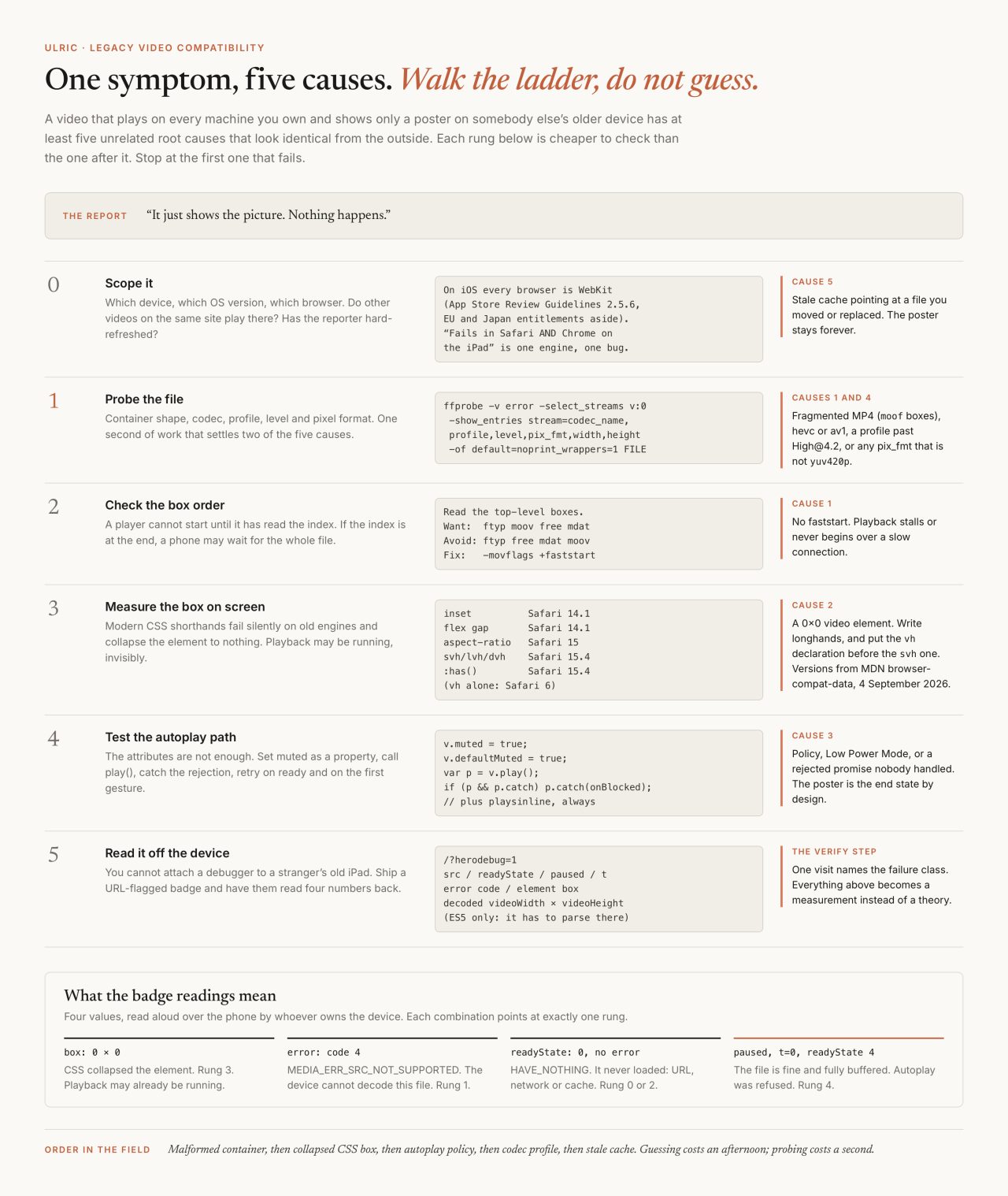
The search I have typed more than once is some version of "HTML5 video not playing in Safari". It is a bad search, because the phrase names a symptom with at least five unrelated causes and no browser will tell you which one you have. A file plays on my machine, plays on my phone, plays in three browsers, and then shows a poster and nothing else on somebody's older iPad. Here is the ladder I walk, cheapest rung first, and the encode that settles most of it before it starts.
On Monday 13 July 2026 a client told me the video on their home page had stopped playing on an older device. It was three separate faults stacked on one file, and I spent the first hour fixing the wrong two because I guessed instead of measuring. That afternoon became a written checklist, the same reflex as writing the rules down so slop cannot recur.
Why does one file play everywhere except on one device?
Because "it does not play" is five different faults wearing the same face. In the order I actually find them: a fragmented or malformed container, a CSS rule that collapsed the video element to nothing, the autoplay policy, a codec profile past what the chip can decode, and a stale cache pointing at a file that moved.
Before touching the file, scope the report. Which device, which OS version, which browser, and do other videos on the same site play there? If they do, diff those two videos rather than auditing the whole stack. On iOS the browser question mostly answers itself, because Apple's App Store Review Guidelines still say:
Apps that browse the web must use the appropriate WebKit framework and WebKit JavaScript. You may apply for an entitlement to use an alternative web browser engine in your app.
Read that next to a report saying "it fails in Safari and in Chrome on the iPad". Outside the EU and Japan entitlements, that is one engine, tested twice.

What does ffprobe say about the file?
Run it first, every time. One second of work settles two of the five causes.
ffprobe -v error -select_streams v:0 \
  -show_entries stream=codec_name,profile,level,pix_fmt,width,height \
  -of default=noprint_wrappers=1 FILE
Four red flags live in that output. A codec_name of hevc or av1 means an older chip has nothing to decode it with. A profile and level past High at 4.2 means the same thing by a different route. And anything in pix_fmt other than yuv420p is the quiet one, worth reproducing yourself, because it happens by accident rather than by decision.
Encode a clip from a folder of PNG frames and leave the pixel format alone:
ffmpeg -i frames/f%03d.png -c:v libx264 -crf 23 out.mp4I ran exactly that on 4 September 2026 with ffmpeg 8.0.1 and probed the result. The profile came back as High 4:4:4 Predictive and the pixel format as yuv444p, because PNG carries full colour and ffmpeg politely preserved it. Read out of the file's own avcC box, the codec string is avc1.F40016, which is the string for the file I encoded rather than a name for the profile: only the leading F4 identifies High 4:4:4 Predictive, and the last two digits are the level, which moves with the resolution. No consumer hardware decoder implements that profile, and the file still plays, which is the trap. Desktop players decode it in software and so does Chrome, which ran it at readyState 4 with currentTime advancing when I loaded it in 152.0.7977.77. WebKit refuses the same file and raises MediaError code 4. That split is precisely how it reaches production: it worked everywhere I looked.
Why does the moov atom decide whether playback starts at all?
Because a player cannot show frame one until it has read the index, and by default the index is written last. An MP4 is a sequence of boxes: ftyp declares the file type, mdat holds the samples, and moov holds every timestamp, sample offset and decoder configuration. The ffmpeg documentation is blunt about which end it lands on:
Run a second pass moving the index (moov atom) to the beginning of the file. This operation can take a while, and will not work in various situations such as fragmented output, thus it is not enabled by default.
In the file I encoded above, the decoder configuration sits at byte 299,769 of 300,405, which is 99.8 per cent of the way in. In a scroll-scrub film already running on this site, encoded with -movflags +faststart, the same structure sits at byte 547 of 4,706,328. First case, a browser has to fetch the whole file before it knows what the video is. Second case, the first packet off the wire carries everything the decoder needs.
While you are reading box order, look hard at the second box. If it is moof you have a fragmented MP4, which is what MediaRecorder produces and what a modern engine plays without complaint. Old WebKit will not play it progressively in a plain video tag, and in my field notes it is the most common reason a file works everywhere except one device.

Which H.264 profile is actually safe?
Main at level 4.0 for the main rendition and Constrained Baseline at level 3.1 for the fallback. The reason sits on Apple's own specification pages, one model year apart. The first-generation iPad supports "H.264 video up to 720p, 30 frames per second, Main Profile level 3.1". The iPad 2 supports "H.264 video up to 1080p, 30 frames per second, High Profile level 4.1". That pair of lines is the whole High profile story, and a file the hardware cannot decode raises MediaError code 4, MEDIA_ERR_SRC_NOT_SUPPORTED, which nothing on the page surfaces unless you are listening for it.
Level matters separately from profile, and it is the part most guides skip. A device whose specification stops at level 3.1 refuses a level 4.0 file even though it knows Main perfectly well. The codec string carries both, in a format MDN documents as avc1.PPCCLL, "six hexadecimal digits specifying the profile number (PP), constraint set flags (CC), and level (LL)". Read out of the two files I encoded for this post: avc1.4D4028 is Main at level 4.0, avc1.42C01F is Constrained Baseline at level 3.1.
The honest summary on codecs is dull, and I would rather write the dull true one. H.264 in an MP4 remains the floor. MDN recommends an MP4 container with the AVC video codec and AAC audio because that combination is "broadly-supported ... by every major browser, in fact". AV1 produces the smallest files and is supported in all browsers, but in Safari only on devices with a hardware decoder, which MDN currently lists as M3 MacBooks and later, iPhone 15 Pro, and iPhone 16 and later. VP9 works across every current browser, minus alpha transparency in Safari. Serve either as a first <source> if you have the encoding budget. Neither is what the last source in the list should be.

Is the video element actually on the screen?
Check this before you touch the codec, because it produces the identical symptom and the fix is free. Modern CSS shorthands do not throw on an old engine, they are ignored, and the rule around them can collapse the video to a zero-height box. Playback may be running perfectly, invisibly.
The ones that have caught me, with the Safari version each needs according to MDN's browser-compat data on 4 September 2026: inset (14.1), flex gap (14.1), aspect-ratio (15), the svh, lvh and dvh units (15.4), and :has() (15.4). My own note had 14.5 for the first two, wrong by four point releases in a checklist that exists to stop guessing, so I corrected it against the compat data rather than against memory.
Two rules cover the class. Never write inset on a video layer; write the top, right, bottom and left longhands, identical on a modern engine and free. And write the vh declaration before the svh one, because vh has worked since Safari 6: an old engine keeps the value it understands and a new one overrides it on the next line.
What do the autoplay rules actually say?
Less than people assume, and the same thing in all three engines. Apple's current developer documentation for delivering video to Safari states the requirement in one sentence:
Video elements that include <video autoplay> play automatically when the video loads in Safari on macOS and iOS, only if those elements also include the playsinline attribute.
The same page adds that a video element "can use the play() method to automatically play without user gestures only when it contains no audio tracks or has its muted property set to true", and that playback "stops if the video element isn't visible onscreen or is out of the viewport". That last one is a feature: a background clip scrolled off screen is paused, not broken.
Chrome states its rule as a list of conditions rather than a guarantee, which is a distinction worth keeping. The Chromium autoplay policy says media "will be allowed to autoplay under the following conditions", and names four: "the content is muted, or does not include any audio (video only)", the user tapped or clicked somewhere on the site during the session, the site added to the home screen on mobile, and a Media Engagement Index score on desktop. Muted is the first condition, not a promise. The line everyone quotes, that muted autoplay is always allowed, comes from a Chrome blog post whose own footer reads Last updated 2017-09-13, and "always" is the word I would not build on. Firefox blocks media with sound by default and permits muted media, though a user who picks Block Audio and Video in settings blocks even the muted case.
There is a way to ask instead of assume, and it is not ready yet. Navigator.getAutoplayPolicy() returns allowed, allowed-muted or disallowed, and that third value on its own settles the argument about "always". It is also Firefox 112 and nothing else: MDN's browser-compat data has it unimplemented in Chrome and in Safari as of 4 September 2026. Use it where it exists, and keep the portable answer underneath it.
The portable answer is the part that eats afternoons. play() returns a promise, and MDN is exact about what happens when the policy says no: it "is rejected when playback fails to begin (such as if autoplay is denied)", with an error named NotAllowedError. Nothing else happens. Attach a handler, or a blocked autoplay and a broken encode are the same experience.
v.muted = true;          // as a PROPERTY, not only the attribute
v.defaultMuted = true;
var p = v.play();
if (p && p.catch) p.catch(function () {
  // blocked: the poster is now the end state, on purpose
});
Two habits earn their keep on WebKit. Retry once on the first user gesture (pointerdown, touchstart, keydown or scroll, registered once and passive), which covers a phone in Low Power Mode: WebKit has disabled autoplay of silent video in iOS Low Power Mode since a patch Chris Dumez landed in March 2017. And put playsinline and the legacy webkit-playsinline on together, because without inline playback an iPhone takes the video fullscreen instead of playing it where you put it.
The encode, flag by flag
Two renditions. The first is what everybody gets; the second is what a watchdog swaps in when the first one fails.
ffmpeg -y -i SRC \
  -c:v libx264 -profile:v main -level 4.0 -preset slow -crf 23 \
  -pix_fmt yuv420p -g 60 -movflags +faststart \
-c:a aac -b:a 128k -ar 44100 out-1080.mp4| Flag | What it buys |
|---|---|
-c:v libx264 | H.264, the one codec every browser and every chip in service can decode. |
-profile:v main | Drops the High profile tools an older decoder does not implement. Costs a few per cent in file size. |
-level 4.0 | Caps the decoding work per second so the chip's own ceiling is respected, separately from the profile. |
-preset slow | Spends CPU at encode time to spend fewer bytes at serve time. Encode once, serve forever. |
-crf 23 | Constant quality rather than constant bitrate. Lower is better and bigger; 23 is a sane default for screen content. |
-pix_fmt yuv420p | Eight-bit 4:2:0. The only chroma layout consumer hardware decodes. |
-g 60 | A keyframe every two seconds at 30fps, so seeking lands on a keyframe instead of decoding forward from the last one. |
-movflags +faststart | Moves the index to the front so playback can begin before the file finishes arriving. |
-c:a aac -b:a 128k | AAC in MP4, the audio half of the universally supported pair. Use -an instead when the clip is silent. |
ffmpeg -y -i SRC -vf "scale=720:-2" \
  -c:v libx264 -profile:v baseline -level 3.1 -preset slow -crf 24 \
  -pix_fmt yuv420p -movflags +faststart -an out-720-base.mp4
Run against the 1280 by 800 scrub film on this site, those two commands produced 5,503,169 bytes of Main at level 4.0 and 2,044,690 bytes of Constrained Baseline at level 3.1. Asking x264 for baseline gets you Constrained Baseline, the subset every decoder implements, and scale=720:-2 holds the aspect ratio while forcing an even height, because 4:2:0 subsampling cannot represent an odd dimension.
Two rules live around those commands rather than inside them. Encode from the pristine original, never from an intermediate transcode. And on a shared host add -threads 2: libx264 auto-threads one worker per core, which on a large box trips the cgroup process cap and exits 187 with "generic error in an external library". Run long encodes over SSH rather than through an HTTP request, where a proxy cuts the connection at around a hundred seconds and can kill the job between the file rename and the database update.
How do you debug a device you cannot attach to?
You ship the debugger to the device and ask its owner to read four numbers back. There is no Web Inspector session to open on a stranger's old iPad, so the badge has to be a URL flag and its output has to be short enough to say out loud.
if (/[?&]viddebug=1/.test(location.search)) {
  var v = document.querySelector('video');
  var dbg = document.createElement('div');
  dbg.style.cssText = 'position:fixed;left:8px;bottom:8px;z-index:9999;'
    + 'background:rgba(0,0,0,.85);color:#9FE29F;font:11px/1.5 monospace;'
    + 'padding:8px 10px;border-radius:8px;white-space:pre-wrap';
  document.body.appendChild(dbg);
  setInterval(function () {
    var r = v.getBoundingClientRect();
    dbg.textContent = 'src: ' + (v.currentSrc || '(none)').split('/').pop()
      + '\nreadyState:' + v.readyState + '  paused:' + v.paused
      + '  t:' + v.currentTime.toFixed(1)
      + '\nerror:' + (v.error ? ('code ' + v.error.code) : 'none')
      + '\nbox:' + Math.round(r.width) + 'x' + Math.round(r.height)
      + '  decoded:' + v.videoWidth + 'x' + v.videoHeight;
  }, 800);
}
Every line of that has to be ES5. No arrow functions, no let, no template literals, because it has to parse on the very engine you are debugging. A syntax error in the badge takes the whole script out and you learn nothing.
The readings map one to one onto the ladder. A box of 0 by 0 is CSS collapse, and playback may already be running. An error of code 4 is MEDIA_ERR_SRC_NOT_SUPPORTED: this device cannot decode this file. A readyState of 0 with no error is HAVE_NOTHING, so the fault is the URL, the network or the cache. Paused at t=0 with a readyState of 4 means the file is fine and fully buffered, and the policy said no. Same discipline as the verifier in agentic loops in production: measure the artifact from outside, never let the thing under test report on itself.
The layer I had not audited
While writing this I ran the ladder against my own site. The five scroll-scrubbed films, ten renditions between them, came back clean on every rung: H.264, yuv420p, box order ftyp moov free mdat on all ten, levels 3.1 and 3.2, and no audio stream at all. They are High profile rather than Main, which puts their floor at 2011 Apple hardware, and on a decorative demo card I am comfortable with that.
Then I looked at the posters. All five are WebP, and WebKit added WebP in Safari 14, which shipped in September 2020. So on any iPhone or iPad still running iOS 13, the last thing in my fallback chain is a format newer than the video it stands in for. The poster attribute takes exactly one URL: no srcset, no type negotiation, no second chance. My own image helper does format negotiation, but these posters are written as literal paths in the theme and never pass through it. Same shape as an image pipeline that failed silently, where every layer reported success and the artifact was empty.
The rule I took out of that is short enough to keep: a fallback has to be older than the thing it falls back from. A poster is the bottom of the chain by definition, so it should be the most boring file on the page. Mine are queued for a JPEG sibling and a one-line change in the theme.
What I have not settled is whether to keep the WebP at all once the JPEG exists. The five posters come to 215 KB against 48 MB of video, which is a rounding error I have been optimising out of habit.
Common questions
Why does my HTML5 video play in Chrome but not in Safari?
Usually one of five things, and probing beats guessing. Run ffprobe on the file: a fragmented MP4 (moof boxes), an hevc or av1 codec, a pixel format other than yuv420p, or a profile past what the device decodes will each show a poster and nothing else. If the file is clean, check whether CSS has collapsed the video element to zero height, then check the autoplay path, since WebKit needs the playsinline attribute and either a muted property or no audio track at all.
What ffmpeg settings make a video play on every browser?
H.264 in an MP4, Main profile at level 4.0, pixel format yuv420p, and -movflags +faststart, with AAC audio or -an when the clip is silent. For the oldest hardware, add a second rendition at Constrained Baseline level 3.1 and 720 pixels wide. MDN recommends an MP4 container with AVC and AAC because that combination is supported by every major browser.
What does -pix_fmt yuv420p actually do?
It forces eight-bit 4:2:0 chroma subsampling, which is the only layout consumer hardware decoders implement. Encoding from PNG frames without it produces a High 4:4:4 Predictive stream with a yuv444p pixel format, whose codec string starts avc1.F4 (avc1.F40016 for the file I encoded, since the last two digits are the level). No consumer hardware decoder implements that profile, so whether it plays comes down to software: WebKit refuses the file and raises MediaError code 4, while Chrome software-decodes it and plays it. That is why it survives your own testing and fails on somebody else's iPad.
Why does faststart matter for web video?
An MP4 keeps its index in a box called moov, and a player cannot show the first frame until it has read that box. ffmpeg writes moov at the end of the file by default. Measured on two files encoded on 4 September 2026, the decoder configuration sat at byte 299,769 of 300,405 without faststart and at byte 547 of 4,706,328 with it, so playback can begin while the rest of the file is still arriving.
Why does autoplay fail silently in the browser?
Because play() returns a promise, and MDN documents that the promise is rejected with a NotAllowedError when autoplay is denied. If no catch handler is attached, nothing at all is reported: a blocked autoplay looks exactly like a broken file. Set muted as a JavaScript property rather than relying on the attribute, include playsinline, attach the catch, and retry once on the first user gesture to cover iOS Low Power Mode.
Related