Insights
A social composer that exports in the browser
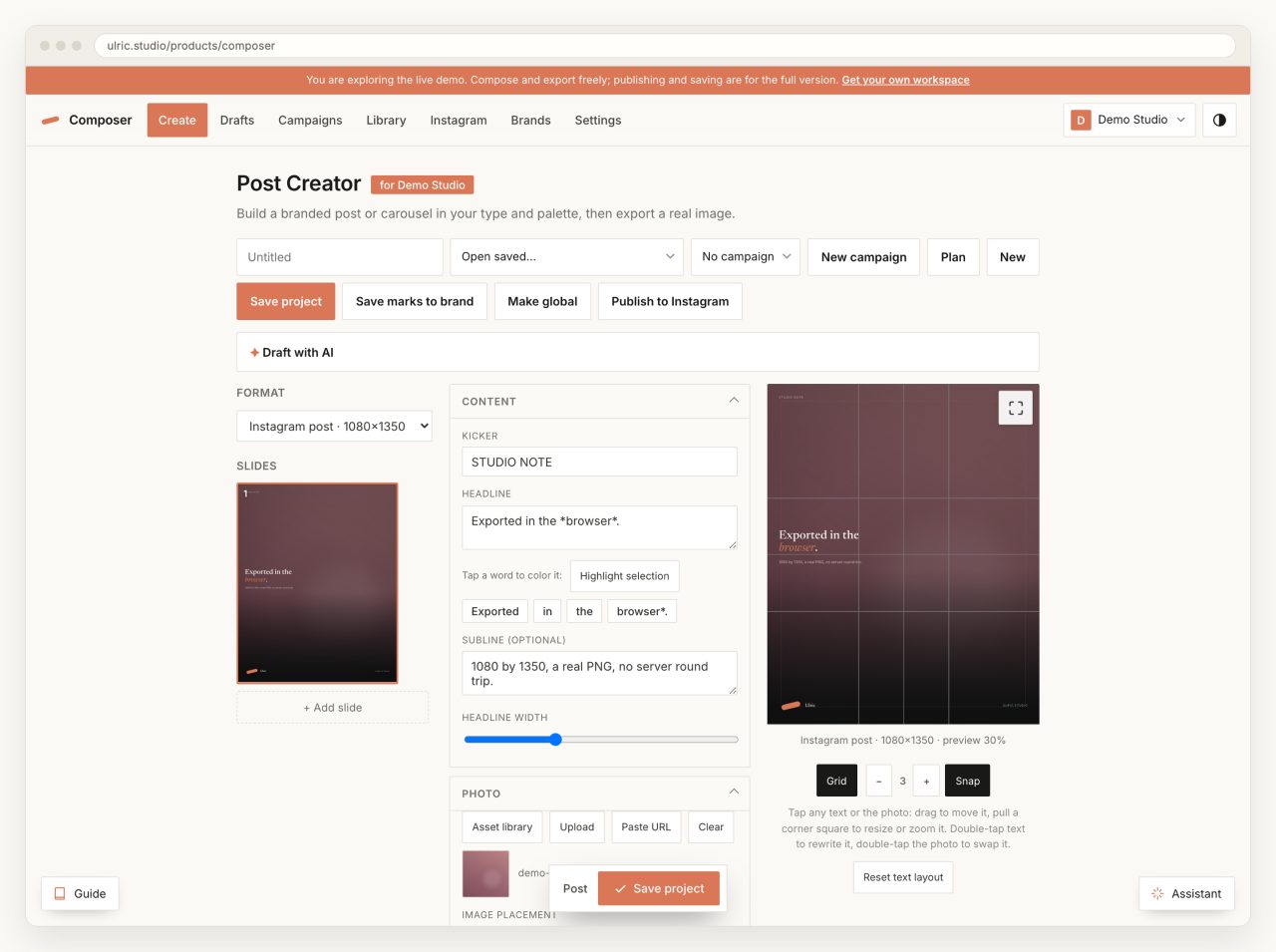
On 4 September I pointed a headless browser at the live demo of my own composer, told it to export the slide on screen, and read the bytes back: 1,056,711 of them, a PNG, 1080 by 1350, produced without a single request leaving the page. Three Chromium runs, and the fastest came back in 714 milliseconds; WebKit, later, was faster still. That measurement is the product. The Ulric Composer builds branded Instagram posts and reels in a browser and renders the finished file there too, and almost everything interesting about it follows from that one decision.
What does it mean for a composer to export in the browser?
It means the file you download is drawn by the same machine that drew the preview. There is no render worker, no font server, no queue, and no upload of your photographs to somebody else's box so a headless Chrome can screenshot them. The preview is a DOM. The export is a 2D canvas. Both read the same state object, and the export is finished before a spinner would have been worth showing.
The output sizes are not design choices, they are the platforms' numbers, and the whole list is five entries:
{ "key": "ig-post",   "label": "Instagram post",   "w": 1080, "h": 1350 }
{ "key": "ig-square", "label": "Instagram square", "w": 1080, "h": 1080 }
{ "key": "ig-story",  "label": "Story / Reel",     "w": 1080, "h": 1920 }
{ "key": "fb-link",   "label": "Facebook link",    "w": 1200, "h":  630 }
{ "key": "linkedin",  "label": "LinkedIn",         "w": 1200, "h":  627 }
A slide is laid out at its real pixel size and scaled down to fit the screen, so the preview is a scaled photograph of the export rather than an approximation of it. I ran the same export six times on 4 September against the live app. Chromium returned 1,056,711 bytes every time, in 1336, 1145 and 714 milliseconds. WebKit returned 1,031,484 bytes once and 1,028,994 twice, in 700, 267 and 271 milliseconds. Same slide, same code, about 27 KB apart, because the rasterizer and the PNG encoder belong to the browser and not to me. Deterministic inside an engine, not across them, which is worth knowing before anyone promises byte-identical output.

Why does the text go through an SVG foreignObject?
Because it is the only way to get real CSS typography onto a canvas without rewriting text layout by hand. The slide's own HTML is rewritten as XHTML, wrapped in an <svg><foreignObject> at the exact output size, handed to an Image, and drawn. The web fonts are fetched and inlined as data URLs first, so the canvas never taints and the letterforms are the ones on screen rather than a fallback.
Photographs cannot make that trip, and the comment sitting above drawFit in postcreator.js is there to say why. WebKit will not paint any image inside a foreignObject that is being rasterized to a canvas. Not an <img>, not a CSS background, no format. It comes out blank, which is why the pipeline has two lanes instead of one.
So the slide is laid out offscreen at full size, every image's rectangle is read with getBoundingClientRect(), and each photo is drawn onto the canvas by a small function that reproduces object-fit: cover and contain into that measured box. Then the text layer is rasterized over the top with its images stripped and its background made transparent. Marks go last. The rects are read only after every offscreen image has finished loading, because an uncached logo with height:auto measures zero tall and quietly disappears from the file.
I learned the second half of that on 28 July. The brand's footer mark is an inline SVG, and inline SVG is an image as far as that rule is concerned, so exports were coming out with a hole where the logo should be. The fix was to measure the mark, clone it with an explicit width and height and a resolved currentColor, and draw it as one more canvas mark. Which broke the footer in a subtler way: pulling the logo out of the overlay collapsed its flex slot, the wordmark slid left into the gap, the footer lost height, and every bottom-anchored headline moved with it. The second fix leaves a visibility:hidden div of exactly the measured size where the logo used to be. Never remove an element from a layout you are about to measure without leaving something its exact size standing in its place.
What do two composers share?
A file called studio-fx.js, and a schema of four numbers. Post and reel are separate engines with separate state, but every overlay a person can reach is described the same way in both:
fx = { scrim: 0-100, tint: 0-100, tintColor: '#000000', vignette: 0-100 }One function turns that into stacked CSS background gradients for the preview. Another fills the same gradients onto a 2D canvas for the export. The shared module also owns the crop dialog, the badge and logo panels, the alignment control, the tap-a-word emphasis chips and the phone dock, so an option added to one composer arrives in the other by construction rather than by discipline. That seam is why the Post Creator and the Reel Creator read as one product rather than two.

Where does the MP4 come from?
From one of two places, and only one of them is a server. The in-page path composites the clip and the overlay onto a canvas frame by frame, captures that canvas with canvas.captureStream(30), and records the stream with MediaRecorder at a bitrate of width times height times 4.2, which is about 8.7 Mbps at 1080 by 1920. The clip's audio and any music bed are routed through Web Audio into the recording so their fades ride along, sample accurate, rather than being re-applied afterwards.
The container is whatever the browser will actually give you, asked in order:
var mime = MediaRecorder.isTypeSupported('video/mp4') ? 'video/mp4'
  : MediaRecorder.isTypeSupported('video/webm;codecs=vp9,opus') ? 'video/webm;codecs=vp9,opus'
  : MediaRecorder.isTypeSupported('video/webm;codecs=vp8,opus') ? 'video/webm;codecs=vp8,opus'
  : 'video/webm';
My own comment above that ladder says MP4 "where the browser supports recording it (Safari)", and writing this post is how I found out the comment is stale. WebKit announced MediaRecorder in November 2020 with the line "Safari currently supports the MP4 file format with H.264 as video codec and AAC as audio codec", and Chrome shipped MP4 muxing of its own in Chrome 126. Probing the live app on 4 September, both the Chromium and the WebKit build I drove returned true for video/mp4. Firefox is the holdout: its bug for video/mp4 in MediaRecorder was filed in 2020 and is still open, so the rest of that ladder is not decoration.
Recording in a tab is a hostile environment and the code reads like it. The render clock is the clip's own currentTime rather than wall time, because a clip that stalls to buffer used to record frozen frames and sometimes never reach the finish line. There is a 15 second watchdog on metadata, an 8 second stall watchdog, and a hard ceiling of two and a half times the reel length plus 25 seconds. Hiding the tab aborts the render and says so, because requestAnimationFrame stops in a hidden tab and the alternative is a progress bar that never moves. None of that was in the first version. All of it is scar tissue.
The server path exists for the reels that need to be kept. ffmpeg takes the clip, the base overlay PNG and one PNG per timed line, and builds a filter chain with a link per line: an alpha fade in, an alpha fade out, then overlay=x:y:enable='between(t,t0,t1)' so line two sits over line one. Entrance and exit travel are per-frame x and y expressions, and the distances in them are 30 and 90 canvas pixels, the same constants the preview and the browser recorder use. Three renderers, one pair of numbers. The encode is deliberately modest, because the shared host is:
-c:v libx264 -threads 2 -preset veryfast -crf 22
-pix_fmt yuv420p -profile:v high -movflags +faststart
That +faststart is not optional for anything that will be scrubbed over the web, for reasons I went through in the post on video that plays everywhere. The in-browser render is download only by design: it never touched the server, so it is never listed among saved reels. One thing I noticed only while writing this. "Compressed" means two different things in the two paths: the browser recorder drops the frame to 720 by 1280, the server keeps 1080 by 1920 and raises the constant rate factor to 30. Both make a smaller file, which is what the label promises, but they are not the same file and the label should say which.

Why is there a Rust build and a PHP build?
Because the host that runs the public one cannot run the other. The composer started as a standalone product: a single Rust binary on axum, sqlx and tokio, serving a Vite single-page app and a JSON API, with an embedded Postgres underneath so there is nothing to install, plus a Tauri shell that runs the same server in process behind a native Mac window. It is a pleasant thing to own. It is also unrunnable on the shared hosting the studio site lives on, which is PHP 8.3 and MySQL with no Postgres, no Node, no long-lived process and no port to bind.
So the live one at ulric.studio/products/composer is a native PHP and MySQL port of the same application running the identical front end. The engineering that makes that work is small: the PHP shell injects a <base href> and a global, and the app installs a fetch shim so every absolute path written for the domain root keeps working under a subdirectory.
const APP_BASE = (window.__APP_BASE__ || '').replace(/\/$/, '');
const withBase = (u) => (APP_BASE && /^\/(api|media|renders|thumb)(\/|$)/.test(u)
  ? APP_BASE + u : u);
One bundle, either address. The trap that cost me an afternoon was that library uploads went through XMLHttpRequest, which is not fetch, so they bypassed the shim and posted to the domain root where nothing was listening. Uploads failed silently under the subpath and worked perfectly at the root. A shim that covers one transport covers none of them.

The dock, and a timeline that had to be one thing
On a phone the control panels do not fit beside the canvas, and stacking them buries the preview. The editors put every section behind an icon in a bottom dock, and tapping an icon lifts that section into a sheet over the canvas. Sections are moved into the sheet and moved back when it closes, never cloned, because two copies of a live control panel is a bug generator. All of it follows from the rules in building for one thumb.
The timeline had to become a single object rather than a set of separate controls. The clip trim sits on top, each text line gets its own track below it, music and detached clip audio get theirs, and one playhead crosses all of them. The filmstrip behind the clip row is drawn on the server and cached, so a phone never decodes a video to render its own timeline art.
Two phone traps are worth naming because neither shows up in a desktop harness. The dock's menu panel is fixed positioned, and inside a horizontally scrolling bar iOS Safari clipped and mispositioned it, so every row was dead on a real iPhone while passing every automated check. It is now portaled to the body. And acting on pointerup puts the target panel on screen before that same tap's click is dispatched, so a panel that closes on an outside click opened and shut in one gesture, seven milliseconds apart. Anything that acts on pointerup and then reveals something has to swallow exactly the next click.
The export spec, and where the tool does not meet it
A production contact at Meta gave me the studio standard in July 2026 and the rule underneath it is one line: design at 2x, upload at 1x. Instagram and Facebook feed share one file, designed at 2160 by 2700 and exported at 1080 by 1350. Google Business Profile is designed at 2400 by 1800 and exported at 1200 by 900. Export as JPG at 80 percent quality in sRGB, never PNG, because the platforms over-compress PNGs anyway.
The composer's format list is exactly the upload column of that spec. It does not do the design column. It renders at 1x and exports PNG, so the 2x source that keeps photographic detail alive through recompression is still something I make in a design tool rather than in my own. That is the honest gap, and it is two changes: a scale factor on the canvas, and a JPEG option on toBlob, which already takes a quality argument.
Publishing has its own opinion. Meta's content publishing documentation is blunt: "JPEG is the only image format supported." So the publish route takes the PNG the browser made, composites it onto white because JPEG has no alpha, and re-encodes at quality 92 before handing Instagram a URL to fetch. Ninety-two is above the 80 the spec asks for, which costs bytes on a file the platform will recompress anyway. The same page caps a published carousel: "Carousels are limited to 10 images, videos, or a mix of the two." So the composer's publish route caps at ten as well, and anything longer has to be posted by hand.
What generalizes from three renderers
Anything a person can move lives in the state object, and every renderer reads that object rather than reading another renderer. The preview does not export. The export does not screenshot the preview. ffmpeg does not re-derive the layout from a description. That sounds like triplicated work, and it is the only arrangement where a mismatch shows up as a visible bug rather than a slow drift: the moment two of them disagree about where a headline sits, you can see it.
The number I keep coming back to is 30 and 90. Two constants, in canvas pixels, for how far a line travels when it slides in. They are typed into a JavaScript engine, into a canvas painter, and into a pair of ffmpeg expressions, and nothing in the build checks that all three still match. That is the next thing I want to fix, and the honest answer is that I do not yet know whether the right fix is a shared constants file the PHP reads, or a test that renders one second of a reel three ways and compares the pixels.
Common questions
How does a web app export a real PNG without a server?
It draws the design onto a 2D canvas at the exact output size and calls canvas.toBlob with image/png. In this composer the photographs are measured with getBoundingClientRect and drawn straight onto the canvas, the text and scrim are rasterized through an SVG foreignObject with the web fonts inlined as data URLs, and the marks are drawn last. Measured against the live app on 4 September 2026, a 1080 by 1350 slide came out at 1,056,711 bytes in 714 to 1336 milliseconds in headless Chromium on a Mac.
Why are photos drawn on the canvas instead of inside the foreignObject?
Because WebKit will not paint any image inside a foreignObject that is being rasterized to a canvas, whether it is an img element or a CSS background, and whatever the format. The result is a blank area. So the pipeline splits: photos and marks are drawn directly with the canvas 2D API into their measured rectangles, and only the text, scrim and layout go through the foreignObject.
Can a browser record an MP4, or only WebM?
Both, depending on the engine. Safari has recorded MP4 with H.264 and AAC since MediaRecorder shipped in 2020, and Chrome later added MP4 muxing of its own. Firefox still has an open bug for video/mp4 in MediaRecorder, so it records WebM. The right approach is to ask MediaRecorder.isTypeSupported in order, MP4 first, then VP9 WebM, then VP8 WebM, and use whatever answers.
What size should a social image be exported at?
The studio standard is to design at 2x and upload at 1x. Instagram and Facebook feed share one file designed at 2160 by 2700 and exported at 1080 by 1350; Google Business Profile is designed at 2400 by 1800 and exported at 1200 by 900; export as JPG at 80 percent in sRGB rather than PNG, because the platforms recompress everything. For publishing through Meta's API, JPEG is the only image format supported and a carousel is limited to ten items.
Related