Insights
A counselor directory on iOS: what moved to the phone
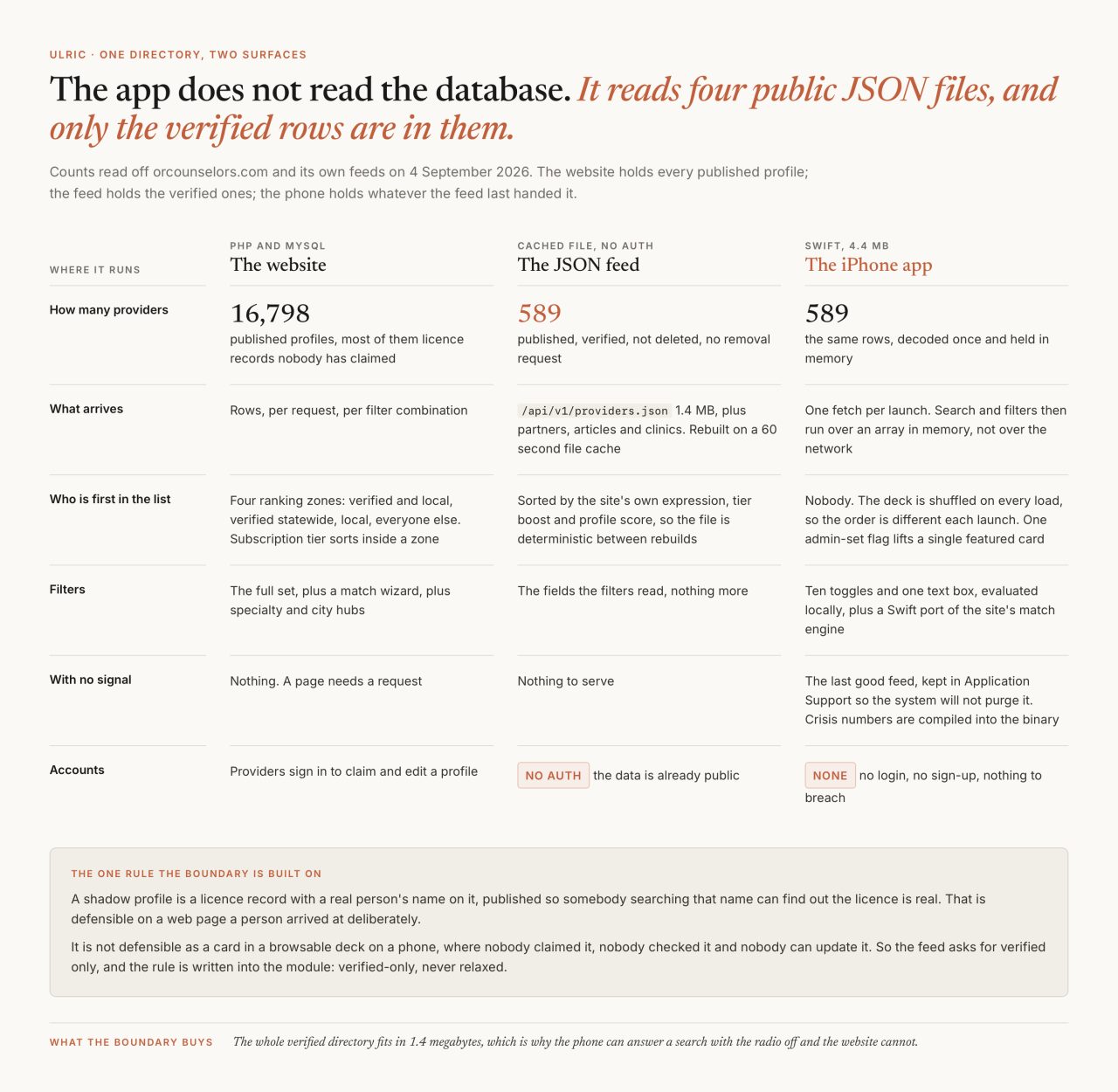
The web directory lists 16,798 Oregon provider profiles. The iPhone app that carries the same directory downloads at 4.4 megabytes and will show you 589 people. Everything I find interesting about building it is inside that gap.
OR Counselor Directory is my own app, the native companion to ORCounselors.com. Free, no account, no login, first shipped on 5 July 2026, now on version 2.4.0. Those and every count in this post were read off the live product page, Apple's lookup endpoint and the site itself on 4 September 2026. I have written before about how the search on the web directory works and about shipping native as a web studio, where the signing and the rejections live. This is the part between them: the boundary, what crossed it, and which of those calls I would defend. There is a case study for the app and one for the platform underneath it.
What did not make the trip to the phone?
About sixteen thousand license records that nobody has claimed.
The web directory is built on public state board data, so most of what it lists is a shadow profile: a real licensed clinician, published so that somebody who has been given a name can check that the license behind it is real, but never claimed, never checked by the person it describes, never updated. On 4 September 2026 the site footer read 16,798 providers listed, 747 verified members, 320 Oregon cities. The feed the app reads returned 589 providers the same afternoon.
That filter is written into the module that builds the feed, and the comment above it does not leave room for a later opinion:
Filters: published + verified + not-deleted + not-removal-requested. Per the project's hard rule ... verified-only, never relaxed.
The reasoning is about the two surfaces, not about data quality. A web page is somewhere a person arrives deliberately, usually carrying a name already, and an unclaimed license record answers exactly the question they came with. A phone app is a deck you flick through, and every card in it reads as a recommendation whether it was meant as one or not. I am not willing to recommend somebody who has never confirmed they are taking clients. Getting providers to claim those profiles is a separate and much slower problem.

How does the app talk to the same database?
It does not talk to the database at all. It reads four JSON files that the website writes.
static let providersJSON = URL(string: "https://orcounselors.com/api/v1/providers.json")!
static let partnersJSON  = URL(string: "https://orcounselors.com/api/v1/partners.json")!
static let articlesJSON  = URL(string: "https://orcounselors.com/api/v1/articles.json")!
static let clinicsJSON   = URL(string: "https://orcounselors.com/api/v1/clinics.json")!
Four public GETs, no auth, no key, no session. On 4 September 2026 they returned 589 providers, 24 partners, 162 articles and 157 clinics, and the providers file was 1,437,889 bytes of JSON. Each response is an envelope carrying a schema version, a generated timestamp and a count, so a build in the wild is reading a shape it can recognize rather than a bare array.
Behind the URL there is no query per request. The module rebuilds a file on disk, cache/api/providers-v1.json, and streams it, with the time-to-live as a constant: CACHE_TTL_SECONDS = 60, echoed to anyone fetching it as Cache-Control: public, max-age=60. A clinician who updates their profile is on every phone that opens the app about a minute later, and the database is never asked twice for the same answer inside that minute.
Two things in that query are there because the people in it are real. A provider who has asked to be removed is excluded by the same clause that asks for verified, and the phone and email columns pass through the provider's own switches, so somebody who turned off personal contact is in the feed with those fields null rather than with their mobile number in a file anyone can fetch.
What happens when the phone has no signal?
It shows the last directory it saw, and the crisis numbers it never needed a network for in the first place.
Every clean fetch writes the raw response bytes to disk, and every cold launch paints from them before the network is asked anything. The file location is a decision rather than a default:
Files live under Application Support (not Caches): the OS won't purge them under storage pressure, so the app stays usable offline.
Two rules keep that cache honest. It stores the exact bytes rather than re-encoded models, so a cached launch runs through the identical decoder a live one does, and it writes only after a decode has succeeded, so a truncated response can never poison what the app falls back to. A failed fetch leaves the last good copy where it was.
The crisis resources are not cached, because they are never fetched. 988, the Crisis Text Line, the Oregon behavioral health line, the Veterans Crisis Line and the Trevor Project are a static array compiled into the binary, and the store listing makes the promise in public: they work without internet. The Ask screen checks the same crisis vocabulary locally before it considers sending anything anywhere, so the one path that must never fail does not depend on a radio.

The failure worth naming is one I built. The app knew it was showing cached data, and used that flag to raise an "Offline" banner, so a throttled server or a bad deploy told somebody sitting on full WiFi that their network was down. On 8 July I moved the banner onto a real network path monitor and left a note on the property:
a failed or rate-limited server fetch on a connected device is not "offline" and must not claim to be.
The general version has outlived the bug. Report the fault you observed, not the one that is easiest to render. An app that blames the reader's network for a server's bad minute is sending somebody to reboot a router because I did not tell two failures apart.
Why does the app not rank anybody?
Because on a phone the list is the product, and I did not want the first screen to be an argument about who deserves the top of it.
The website ranks hard. A filtered search there sorts into four zones, verified and local first, then verified statewide, then local, then everyone else, with subscription tier as one addend inside a zone, and I wrote that ordering up in detail because it is the kind of thing a directory should have to defend. The feed sorts too, by the site's own expression, so the file is deterministic between rebuilds.
Then the app throws that order away. The change is one call, and the comment that governs it, further down the same file, is dated:
providers = try await APIClient.shared.fetchProviders().shuffled()
// ...
// The deck is a FULL random shuffle on every load (Eric, 2026-07-02):
// every verified provider gets equal exposure each launch, no rank bias,
// no pinned faces.
Open the app twice and the order is different. The only thing that lifts a provider out of the shuffle is an is_featured flag I set by hand in the admin, which fills one card above the deck. Where money still touches this, exactly: paid tier breaks ties inside the on-device match results, and a quiz returning fewer than twenty-five real matches is padded with randomly chosen paying providers, shown as featured and carrying no percentage. That mirrors the website, and it is why a padded card looks different from a scored one.
Which filters made the trip?
Ten filters and a text box, and the comment above them is four words long: "Keep this small intentionally."
Telehealth, accepting new clients, verified, sliding scale, the Oregon Health Plan, Medicaid, Medicare, a city, a specialty, an insurance name, and one free-text box that reads across name, credentials, bio, city, specialties and modalities. Each one runs as a predicate over an array already in memory, because the whole verified directory is 1.4 megabytes and there is no reason to ask a server a question you are holding the answer to. Search on the website is a compute endpoint with a query string. Search in the app is a filter call that returns before the keyboard has finished animating, which is what makes it usable with one thumb.
What replaced the missing filters is the part I am happiest with. The website's match wizard used to open in an in-app browser. On 1 July it became a Swift port of the same scoring engine running entirely on the device: the same concern keyword expansions, the same point values, the same denominator built from the questions you actually answered, held in place by twenty-nine tests whose job is keeping the two engines saying the same thing. The phone asks five questions rather than the site's six, because it does not ask for a location it has no reason to hold.
The Ask screen is the one place a question leaves the phone, and it is built to survive not being able to. It tries the server first, running the same natural-language search the website does. If that fails it parses the question on the device instead: Apple's Foundation Models framework where the phone has it, a deterministic keyword parser everywhere else, since the app's floor is iOS 17 and Apple Intelligence does not reach that far down. Both paths hand off to the same local match engine, so the failure mode is a blunter answer rather than an error screen.
What does the App Privacy label actually say?
More than the app does.
Here is what is in the binary. The privacy manifest declares no collected data types at all, and one accessed API, with Apple's reason code for reading your own app's settings:
<key>NSPrivacyTracking</key><false/>
<key>NSPrivacyTrackingDomains</key><array/>
<key>NSPrivacyCollectedDataTypes</key><array/>
<key>NSPrivacyAccessedAPITypes</key>
<array><dict>
  <key>NSPrivacyAccessedAPIType</key>
  <string>NSPrivacyAccessedAPICategoryUserDefaults</string>
  <key>NSPrivacyAccessedAPITypeReasons</key><array><string>CA92.1</string></array>
</dict></array>
There is no analytics SDK and no third-party package of any kind. The network calls are countable: the four feeds, the Ask endpoint, provider photographs, Apple's geocoder for the small map on a profile, and the in-app Safari view. The geocoder is handed a provider's city, never the reader's position, and the app ships without a single location usage string in its Info.plist, so it cannot ask for one. There is no account, so no native screen asks for a name or an email address. The store description says the same in four sentences: "No accounts. No login. No tracking. No ads."

On 4 September 2026, the label a person sees before they download it read like this. Under Data Linked to You: Contact Info, specifically an email address and a name, and Identifiers, specifically a user ID, all for app functionality. Under Data Not Linked to You: user content, a device ID, usage data and diagnostics. My other apps on the same developer account show the panel that reads "Data Not Collected", so nothing here came from an account-wide default. These are answers I gave in App Store Connect for this app, and they describe a product with accounts.
Two readings, and both are worth giving. The generous one is that the answers were written for the service rather than the binary: the More tab opens the site's contact form in an in-app Safari view, and that form does ask for a name and an email address. The plain one is simpler. The answers were filled in during a first submission and never revisited as the app changed. The fix is the same either way and it is mine: bring the answers down to what the binary does at the next submission, and if the web view is the reason anything stays, say so in the description rather than leave it to be inferred.
What I gave up measuring
Everything in this post about a person using the app is unverified by me, and will stay that way. No analytics means I cannot tell you how often the cached deck is what somebody reads, how many searches run with the radio off, or whether anyone has tapped the 988 card. The store shows one rating. That is the entire quantitative record of eleven thousand lines of Swift, and I would still rather have it than the alternative, which is a file on my server describing what somebody looked up on a bad night. The other three apps I ship make the same trade.
What is left is a test that needs nobody's word, including mine. Turn on airplane mode, open the app, and see whether the directory is still there and whether 988 is still one tap away. Everything else in this post you have to take from me or read in the store. That is the boundary in one gesture: whatever crossed to the phone had to be worth holding there with nothing behind it, and most of the directory was not.
Common questions
Why does the iPhone app show fewer providers than the website?
Because the feed the app reads asks for verified profiles only, and never relaxes that. On 4 September 2026 the website listed 16,798 published Oregon provider profiles, most of them state license records nobody has claimed, and the feed returned 589 verified ones. An unclaimed record answers a question on a web page somebody arrived at deliberately. In a browsable deck on a phone it would read as a recommendation.
Does the app work without an internet connection?
Partly, and on purpose. Every clean fetch saves the raw feed to Application Support rather than Caches, so the system will not purge it, and a cold launch paints from that copy before the network is asked anything. The crisis resources, 988 and the Crisis Text Line among them, are compiled into the app rather than fetched, so they work with no signal at all. Anything genuinely new, like an article published an hour ago, needs a connection.
Does the app collect any data?
The binary collects nothing: no account, no login, no analytics SDK, no third-party packages, and a privacy manifest declaring no collected data types. No native screen asks for a name or an email address; the contact form that opens in an in-app browser does, and it belongs to the website, not the app. The app ships without a location usage string in its Info.plist, so it cannot ask where you are. The only API the manifest declares reading is the app's own settings.
How does the iPhone app get its data from the website?
Through four public JSON feeds under /api/v1/, one each for providers, partners, articles and clinics. The app never touches the database. The website rebuilds each feed as a file on a sixty second cache and streams it, so a profile edit reaches every phone about a minute later, and the app bypasses its own HTTP cache for those URLs, so a live fetch is never answered from a stale HTTP cache.
Related