Insights
Shipping a native iOS app as a web studio
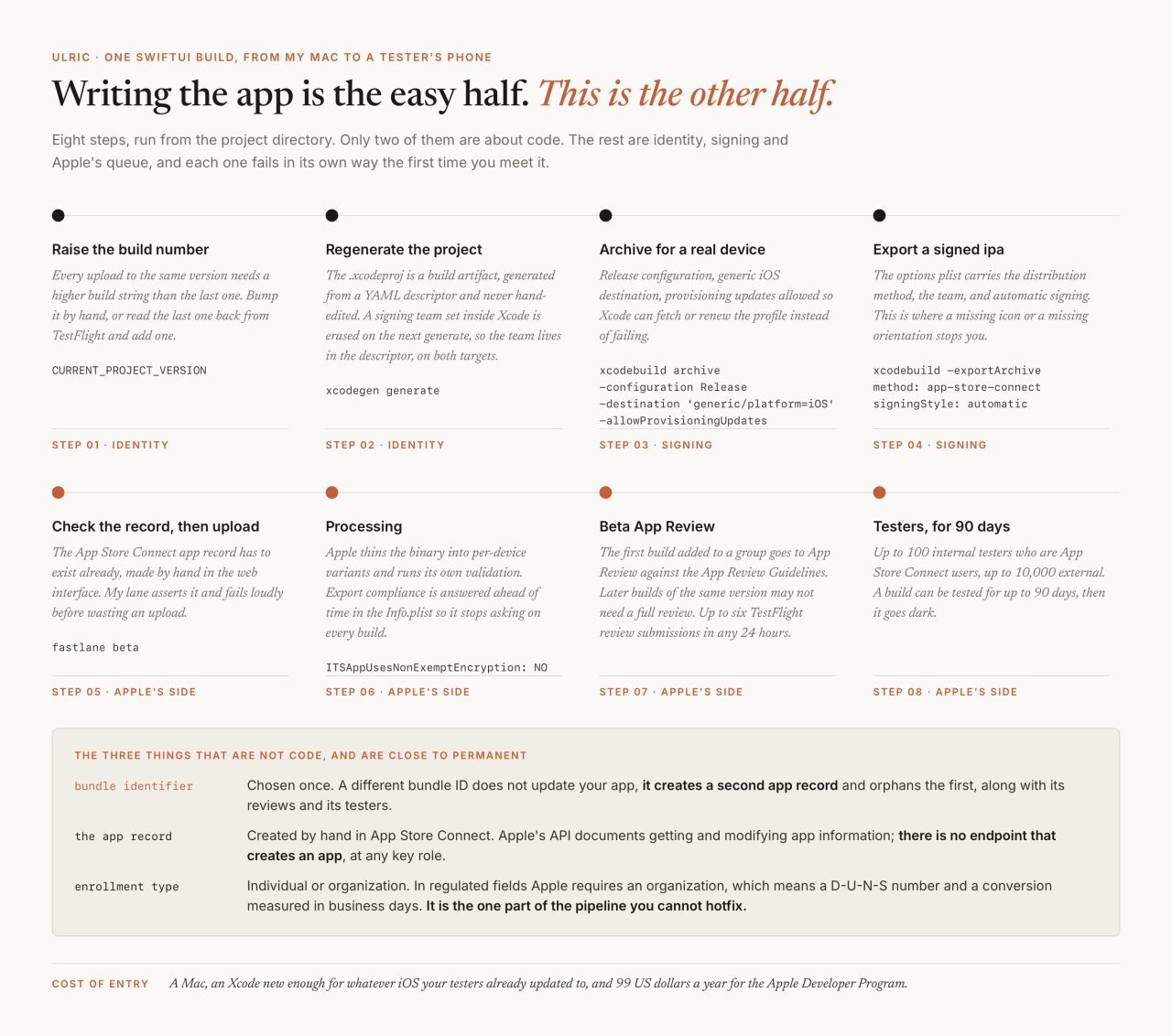
Four of my apps are on the App Store: a statewide mental health directory, and three small tools shipped through my company, CUTI LLC. Every one of them compiled and ran on a simulator long before it reached anybody, because writing a SwiftUI app is the easy half. The hard half is the pipeline that gets a signed build onto someone else's phone, and one of my rejections could not be fixed in code at all.
What does SwiftUI feel like coming from HTML and CSS?
Familiar for about a day. Both models describe a tree and hand it to a framework to draw. State flows down, a change to state redraws the parts that depend on it, and if you have written components in any modern web framework the first SwiftUI view will read like something you already know.
Then six things stop working the way CSS taught you, and none of them are syntax.

The one that took me longest to stop fighting is layout. CSS lets a parent give an order: width: 100%, and the child obeys. SwiftUI runs a negotiation. The parent proposes a size, the child answers with the size it actually wants, and the parent places the result. .frame(maxWidth: .infinity) looks like the CSS line and behaves like a request.
That has a practical consequence in anything that draws a canvas. The composer I build for social posts and reels shows a small preview on a phone and exports a 1080 by 1920 file that has to match it pixel for pixel. On the web I would reach for vw and let the browser do the arithmetic. In SwiftUI I compute the scale myself: every canvas is laid out against a 1080-wide reference frame with a single factor, let k = w / 1080, and every size, offset and font is multiplied by it. Preview and export become the same view drawn at two widths. It is the least clever solution available and the only one I trust.
Then there is the failure with no web equivalent at all. Swift infers types through an entire expression, and a SwiftUI body is one enormous nested expression. Past a certain size the compiler simply stops:
unable to type-check this expression in reasonable time;
try breaking up the expression into distinct sub-expressions
That is not a bug report. It is the type checker declining. The composer's reel view hit it in the build where I added timed text layers and a music bed, and the fix was mechanical: pull the body into a coreView plus two helpers that each take and return some View, one attaching lifecycle, one attaching the media pickers. Same tree, same rendered output, compiles in seconds. A malformed HTML document renders anyway. A SwiftUI layout can be too long to compile.
Why ship native at all?
Because both of the apps I care most about do something a Safari tab on an iPhone cannot.
The composer renders a 1080 by 1920 H.264 file entirely on the device, with no server call anywhere in the app. Getting there cost two dead ends worth naming, both measured on the simulator. AVVideoCompositionCoreAnimationTool, the obvious choice, crashes outright inside QuartzCore. An AVAssetExportSession with a custom compositor, even a Metal-backed one, took roughly 130 seconds to export a two-second clip. What works is duller: read frames with an AVAssetReader over an AVMutableComposition, composite each one in Core Graphics with the overlay rasterized to a transparent image, then write with an AVAssetWriter. About 14 seconds for that same two-second clip, on the simulator and on hardware alike. No browser API on iOS does any of that, which is a different problem from playing video beautifully in a browser, a thing the web is very good at.
The directory is the one where the reason is not technical. I worked a decade in mental health, most recently as a licensed professional counselor, and closed my practice in 2026 to build full time. I know what a person types into a search box when they are looking for a therapist. It is not a query. It is the most private sentence they will write that week. So the app's match engine is a Swift port that scores entirely on the phone, covered by 22 of its own tests, and its natural-language search asks for consent before it hands anything to a third-party model. No account, no tracking. The trust I built with providers on the web side is the same promise on a smaller screen, and on-device inference is a native-only capability. That is what it is for.
Why is distribution the hard half?
Because almost none of it is code, and three of the pieces are permanent in a way code never is.

Start with the pieces you only get to choose once. The bundle identifier is the app's real name: change it and you do not update your app, you create a second app record and orphan the first, along with its reviews and its testers. My own project descriptor carries the warning I left myself, in capitals, next to it. The App Store Connect record has to be created by hand in the web interface, because Apple's API documents getting and modifying app information and has no endpoint that creates one, at any key role. So my upload lane asserts the record exists and stops before wasting a build:
lane :beta do
  ensure_app
  upload_to_testflight(
    api_key: asc_key,
    ipa: "build/ipa/MobileComposer.ipa",
    skip_submission: true,
    skip_waiting_for_build_processing: true
  )
end
Then the ones that bite every cycle. I generate the Xcode project from a YAML descriptor with XcodeGen, so the .xcodeproj is a build artifact I never hand-edit. One sharp edge: a signing team set inside Xcode is erased on the next xcodegen generate, so DEVELOPMENT_TEAM lives in the descriptor, on both targets, because the test bundle is signed too.
And build numbers, which have to go up. Apple's help page only says that "the build string is used to uniquely identify the build throughout the system", but upload validation is stricter than the documentation: a build whose number is not higher than the last one uploaded for that version is turned away before any tester sees it. Bump CURRENT_PROJECT_VERSION by hand, which is what the composer does, or read the last number back from TestFlight and add one, which is what the directory's lane does. Either is fine. Leaving it to a human memory is not.
What does TestFlight cost, and what does it give you?
Ninety-nine dollars a year, a Mac, and a 90-day clock. The Apple Developer Program is a $99 annual membership and TestFlight comes with it. Apple's numbers, from the TestFlight overview: up to 100 internal testers, who must be App Store Connect users on your account, and up to 10,000 external. "You can test a build for up to 90 days," after which "your build becomes unavailable for testers." The first build you add to a group goes to App Review, later builds of the same version may not need a full review, and you can submit up to six builds for TestFlight review in any 24-hour period.
What Apple does not publish, as far as I can find, is a turnaround time for that review. Plan around the absence of a number rather than a number you read on a blog.
Two things I learned by getting them wrong. Build 1 of the composer was rejected for a missing iPad icon and missing orientations, which is what happens when a project defaults to universal and you only ever look at it on an iPhone. The build that shipped is honest about itself: TARGETED_DEVICE_FAMILY "1", iPhone only, a real app icon asset, portrait declared, and ITSAppUsesNonExemptEncryption: NO so the export compliance question stops interrupting every upload.
The second is why TestFlight stopped being optional. My test iPhone runs iOS 27 and this Mac is on Xcode 26.5, which I checked again while writing this. Running from Xcode straight onto the device aborts in an XPC call before any of the app's own code executes: a debugger and OS mismatch, not a defect in the app. Until Xcode catches up, TestFlight is my only path onto real hardware. Worth knowing before you plan a device-debugging workflow around a phone that updates itself.
What actually gets rejected?
In my experience, the account, not the code.
On March 4, 2026, version 1.0 of the directory came back rejected under two guidelines. The first, 1.4.1, said the app provided medical data without regulatory clearance. That was answerable without changing what the app does, because it is a directory and not a symptom checker: a disclaimer at the top of the store description, an offline resources tab surfacing 988, 911 and the Crisis Text Line, and reviewer notes saying directory only, no diagnosis or treatment, in those words. The "not medical advice" line was already on every clinically adjacent screen, so that part of the answer was pointing at what had shipped rather than adding anything.
The second was not a code problem at all. Guideline 5.1.1(ix):
Apps that provide services in highly regulated fields (such as banking and financial services, healthcare, gambling, legal cannabis use, air travel and crypto exchanges) or that require sensitive user information should be submitted by a legal entity that provides the services, and not by an individual developer.
My Apple Developer Program enrollment was an individual. Nothing in Swift fixes that. The path runs through a D-U-N-S Number for the legal entity, which is free, and for which Apple asks you to allow up to five business days from Dun and Bradstreet plus up to two more for Apple to receive it, then a conversion of the enrollment itself. Worth knowing before you choose the entity: the legal name attached to the number becomes the publisher name on your App Store page. That last part is my own working note rather than a line I can point to in Apple's documentation, and it is the reason I would decide the entity before I started the paperwork. The conversion did clear, and the directory has been on the store since, now at version 2.4.0; how it cleared is not in my notes, which stop at a response plan recording that Apple would not approve the build until the conversion was complete.
Then, in July, another one: 5.1.1(i) and 5.1.2(i), the consent guidelines. The relevant sentence is unambiguous.
You must clearly disclose where personal data will be shared with third parties, including with third-party AI, and obtain explicit permission before doing so.
The fix, committed on July 7, was a consent gate in front of any third-party model call, and a re-ask on every update rather than a one-time yes. I would defend that design on its own merits for a mental health directory. Apple made it a condition of shipping. If you are routing anything through a hosted model, the provider cascade behind it is a separate question from the consent in front of it, and only one of the two will get your build rejected.
Which is the rule I would hand anyone crossing over: if your app touches a regulated field, the enrollment type is part of the build. Check it before you write the first view, because it is the only piece of the pipeline measured in business days and the only one you cannot hotfix.
When is a native app the wrong call for a small studio?
Most of the time, and Apple says so in writing.

Your app should include features, content, and UI that elevate it beyond a repackaged website. If your app is not particularly useful, unique, or "app-like," it doesn't belong on the App Store.
That is guideline 4.2, and it is the cheapest advice on the list. A wrapper around a site you already own is not a product, and Apple has written down that they will not shelve it.
The rest of the cost is ongoing. A Mac. An Xcode new enough for whatever iOS release your testers already installed. A second codebase that drifts from the first, with the drift landing on whoever answers the support email. And a release train measured in review cycles: a fix on a site ships in the time one rsync takes, while the same fix on iOS waits for an archive, an upload and a queue. Every build I ship is verified by a real round-trip rather than a report of success, and on iOS you feel the price of each one.
Meanwhile the web side of that choice got better, in ways worth checking before you write off a home screen web app in 2026. Safari 26 changed the default outright:
By default, every website added to the Home Screen opens as a web app. If the user prefers to add a bookmark that opens in their default browser, they can turn off "Open as Web App".
No manifest gymnastics needed for an app-shaped launch. Web push has worked for home screen web apps since iOS and iPadOS 16.4, provided the permission prompt follows a real tap, and since 18.4 Declarative Web Push can show a notification without an installed service worker.
What has not changed is the shape of the funnel. Push still requires that somebody taps Share, then Add to Home Screen, and almost nobody does that unprompted. There is no Background Sync: browser compatibility data still records SyncManager as unsupported in Safari and in Safari on iOS, against an open WebKit bug. There is no App Store shelf. And there is nothing resembling an AVAssetWriter, or permission to write a finished video into the photo library.
So the test I use now is two questions long. Does the thing it does need the phone? Does the way people find it need the store? If the answer is no twice, ship the web app and put the money into the site, which is where the searching actually happens.
The composer is sitting on TestFlight at build 6, internal testers only. Its export tests pass on the simulator, including one that asserts the bottom strip of a finished frame is darker than the top, because a rotated source clip is the specific way an overlay ships upside down and a duration check would never catch it. The check I still owe is the boring one: pick a real clip from a real photo library on a real phone, export it, and watch the file land in Photos. I cannot run that from Xcode until my Mac and my phone agree on a version number, which is not a sentence I expected to write about a build pipeline.
Common questions
What does a SwiftUI and TestFlight pipeline actually look like?
Eight steps from my project directory: raise CURRENT_PROJECT_VERSION so the build number is higher than the last upload, run xcodegen generate, archive with xcodebuild in Release against a generic iOS destination with -allowProvisioningUpdates, export a signed ipa with the app-store-connect method, then upload with a fastlane lane that first asserts the App Store Connect record exists. Apple then processes the build, sends the first one in a group to Beta App Review, and distributes it to testers for up to 90 days.
Why does an iOS build number have to increase?
Because upload validation is stricter than the documentation. Apple's help page only says the build string uniquely identifies the build throughout the system, but a build whose number is not higher than the last one you uploaded for that version is turned away before any tester sees it. Bump CURRENT_PROJECT_VERSION by hand, or read the last number back from TestFlight and add one. Do not leave it to memory.
Can an individual developer account ship a healthcare app?
No. App Review Guideline 5.1.1(ix) says apps in highly regulated fields, healthcare among them, or apps that require sensitive user information, should be submitted by a legal entity that provides the services and not by an individual developer. That was one of the two guidelines cited when version 1.0 of my directory app was rejected on March 4, 2026. The fix runs through a free D-U-N-S Number and an enrollment conversion, and it is the one part of the pipeline you cannot hotfix.
How many testers does TestFlight allow, and how long does a build last?
Up to 100 internal testers, who must be App Store Connect users on your account, and up to 10,000 external testers. Apple states that you can test a build for up to 90 days, after which the build becomes unavailable to testers. The first build added to a group goes to App Review, later builds of the same version may not need a full review, and you can submit up to six builds for TestFlight review in any 24-hour period.
Can a progressive web app replace a native iOS app in 2026?
Sometimes, and more often than in 2023. Since Safari 26 every website added to the Home Screen opens as a web app by default, web push has worked for Home Screen web apps since iOS 16.4, and Declarative Web Push since 18.4 drops the service worker requirement. What a web app still cannot do on iOS: reach anyone with push before they manually add it to the Home Screen, use Background Sync, appear in App Store search, or encode video frame by frame and write it into the photo library.
Related