Insights
The old browser you forgot to test
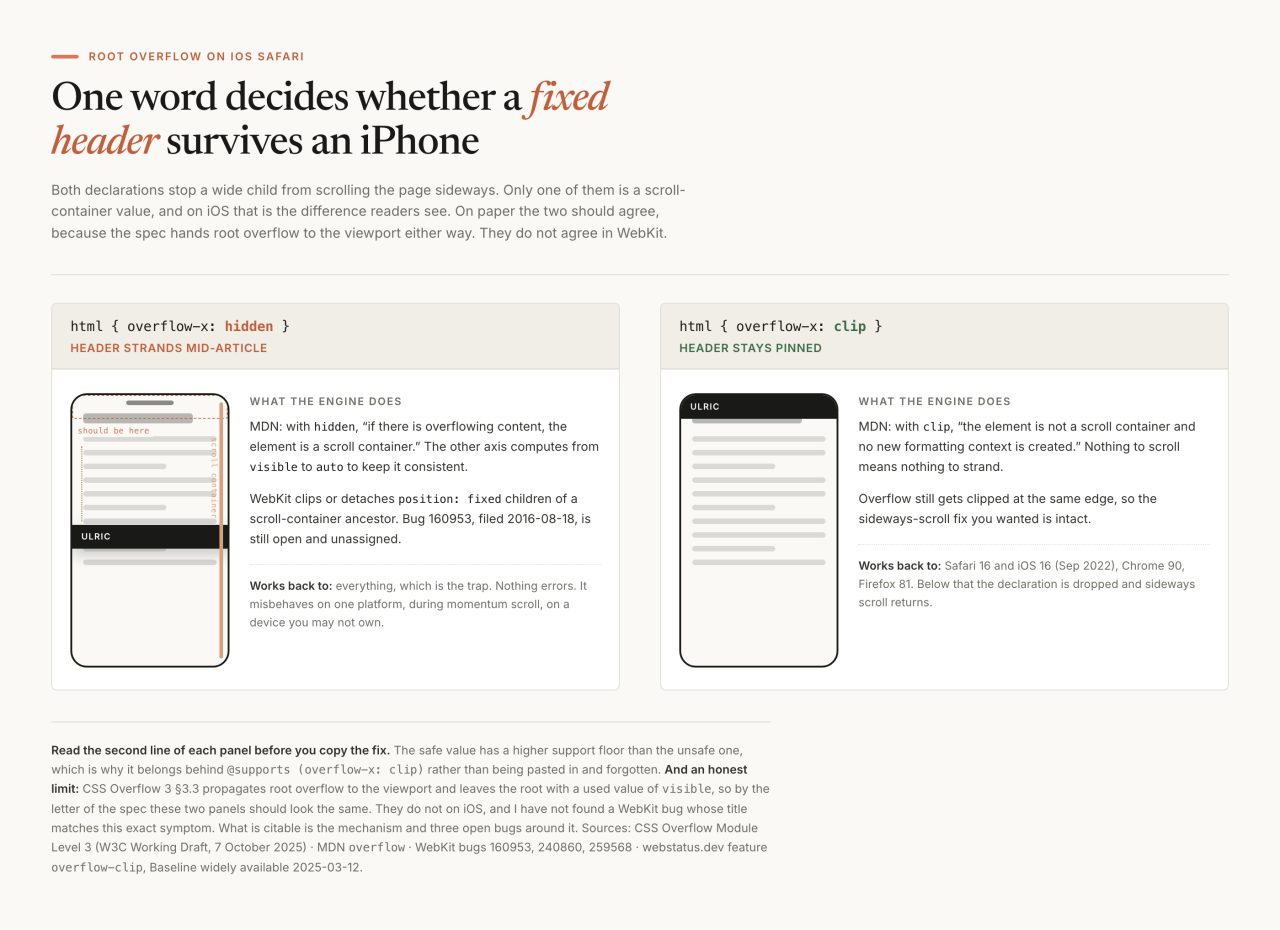
Line 18 of this site's stylesheet reads html{scroll-behavior:smooth;overflow-x:clip}. The word carrying the weight is clip, and it is clip rather than the hidden everyone reaches for because of what gets called the iOS Safari position fixed bug, which I have watched happen and cannot pin to a single filed report: no error, no warning, no console line. The header just lets go during a momentum scroll and parks itself in the middle of paragraph nine.
I put it in on 1 August 2026, in a commit called "Mobile booking + iOS fixed-position hardening". Nothing had broken on my desk. Nothing ever breaks on your desk, which is most of the problem. The failures that cost real readers in 2026 are not the ones people mean by old browser. They are a page that paints nothing because a script threw before it rendered, a layout rule that vanishes because one pseudo-class inside it is younger than the engine reading it, and a fixed element that quietly stops being fixed.
None of the three announce themselves. All three have a cheap defence.
What does overflow-x: hidden actually do to the root element?
It makes the box a scroll container, which is the one thing nobody wanted from it. People reach for overflow-x: hidden to stop a too-wide child from dragging the page sideways, and that part works. The side effect is structural.
With
hidden, overflowing content is clipped at the element's padding box. There are no scroll bars and the clipped content is not visible. If there is overflowing content, the element is a scroll container.
That is MDN on overflow. The same page on clip: "the element is not a scroll container and no new formatting context is created." Both clip at the same edge; only one creates something scrollable. CSS Overflow Module Level 3 adds why the difference reaches the other axis: "The visible/clip values of overflow compute to auto/hidden (respectively) if one of overflow-x or overflow-y is neither visible nor clip." Write overflow-x: hidden and your overflow-y: visible quietly becomes auto. Write clip and nothing else moves.
Why does that break position: fixed on iOS Safari?
By the specification it should not, which is exactly why the bug is so hard to find. A fixed element is positioned against the viewport. The only ancestors that take the viewport's place are the ones carrying transform, perspective or filter, per the fixed-positioning containing block rules. overflow is not on that list, in any value.
WebKit does it anyway. Bug 160953, filed 18 August 2016 and still open and unassigned, is a reporter watching Safari clip a fixed element to an overflow: hidden ancestor that has z-index set:
Teal div should not be clipped at orange border. (The teal div is a fixed-position element, and it should use the viewport as its containing block, rather than using its orange-bordered relpos ancestor.) ACTUAL RESULTS: Teal div is clipped at orange border! (in Safari)
Two more open reports sit next to it, both about root and body overflow not being honoured on iOS: 240860 (2022, overflow: hidden on body ignored when the visual viewport is smaller than the layout viewport, which happens every time the keyboard opens) and 259568 (2023, the same property doing nothing inside an installed PWA). The spec has its own note nearby: "overflow: hidden on the root element might not clip everything outside the Initial Containing Block if the ICB is smaller than the viewport, which can happen on mobile."
Now the honest part. I have no WebKit bug whose title is my exact symptom, and I cannot derive that symptom from the spec either. Section 3.3 hands the root's overflow to the viewport, then says "the element from which the value is propagated must then have a used overflow value of visible," so on paper the two values should land in the same place. On an iPhone they do not. What I can defend is the mechanism, three open bugs around it, and a fix that has held on every device I have put it on since July 2026. Weaker than a citation, stronger than folklore, and worth saying which.

The rule I wrote down afterwards is three lines long. Never put overflow-x: hidden on the root element. Check both html and body when a floating button misbehaves, because either one can reach the viewport. And for interface that must never fail, measure instead of trusting any of it. This site drops an invisible one-pixel probe at the top left and watches it during scroll.
/* fixed-position watchdog: a 1px fixed probe should always sit at 0,0.
   If iOS Safari strands it mid-scroll, nudge the pinned UI to recomposite. */
var probe = document.createElement('div');
probe.style.cssText = 'position:fixed;top:0;left:0;width:1px;height:1px;'
                    + 'opacity:0;pointer-events:none;z-index:-1';
document.body.appendChild(probe);

addEventListener('scroll', function () {
  var r = probe.getBoundingClientRect();
  if (Math.abs(r.top) < 1 && Math.abs(r.left) < 1) return;
  var els = document.querySelectorAll('#back-top, header.site, #rail');
  els.forEach(function (el) { el.style.display = 'none'; });
  void probe.offsetHeight;
  els.forEach(function (el) { el.style.display = ''; });
}, {passive: true});
Hiding and re-showing the pinned elements forces a fresh composite. A blunt instrument, and it has never had to fire on a device I own, which is the honest status of any watchdog: you learn it works by never hearing from it, the same problem as a verifier that only checks for output.
What does the clip fix cost?
A support floor of Safari 16, which is newer than the value it replaces. overflow: clip landed in Firefox 81 on 22 September 2020, Chrome 90 on 13 April 2021, and Safari and iOS Safari 16 on 12 September 2022; webstatus.dev marks it Baseline widely available as of 12 March 2025. Below Safari 16 the declaration does not parse, so it is dropped, so you are back to a page that scrolls sideways.
That is the right way round for a fix to fail, and it is still a change in behaviour somebody will notice. The honest version puts the fix behind a feature query, with the fallback written outside it where an old engine will read it:
/* Legacy path. The value propagates to the viewport and <body> keeps a
   used overflow of visible, so body itself never becomes a scroll container. */
body { overflow-x: hidden; }

@supports (overflow-x: clip) {
  body { overflow-x: visible; }
  html { overflow-x: clip; }
}
The reset in the middle is not decoration. Body's overflow only reaches the viewport while the root's own value is visible in both axes, so once html takes clip, a leftover hidden on body stops propagating and starts doing the thing I was trying to avoid.
Line 18 of my own stylesheet is still the bare declaration with no query around it. On a phone below Safari 16 that means the page can scroll sideways where it should not, which is the smaller of the two problems and one I now know I have.
Why is @supports the honest gate, and user-agent sniffing still wrong?
Because a feature query asks the engine a question the engine can answer. @supports hands the browser a declaration and asks whether it parsed. A user-agent string reports what a browser calls itself. Only one of those stays true when a browser you have never heard of loads the page. It has been available across browsers since September 2015, and the selector() form, which tests a selector rather than a declaration, arrived in Firefox 69, Chrome 83 and Safari 14.1 according to MDN's browser-compat data.
The reason I stopped arguing about sniffing sits in a comment in this repo. The motion engine opens with a stated floor: "Browser floor: Chrome 79 and equivalents (the studio gets read from a Tesla car browser)." I cannot enumerate a car browser. Tesla ships browser features in its release notes and does not publish the Chromium version underneath them, so I do not know what that reader supports, and neither does any support table. A capability query does not need to know. It asks at parse time, on the actual device.
What happens when one selector takes the whole rule down?
The whole rule goes, including the parts that would have worked perfectly. This is the failure mode that makes modern CSS feel dangerous when it is really just unforgiving, and the spec says so in plain words:
For legacy reasons, the general behavior of a selector list is that if any selector in the list fails to parse (because it uses new or UA-specific selector features, for instance), the entire selector list becomes invalid. This can make it hard to write CSS that uses new selectors and still works correctly in older user agents.
That is Selectors Level 4, section 16.1. Section 3.9 is blunter: "a selector list containing an invalid selector is invalid," and user agents "must treat as invalid any pseudo-classes, pseudo-elements, combinators, or other syntactic constructs for which they have no usable level of support." :is() and :where() take forgiving lists, so a stray selector inside them is skipped rather than fatal. :has() does not; the working group made it non-forgiving on purpose, in issue 7676.
I already knew this, in the sense that a comment I wrote in this stylesheet says it out loud: the glass header uses a body class rather than :has() "because one bad selector invalidates the entire list." Then I went looking at what else I had written, and found this on the insights index you are reading. Past tense on purpose: these three lines were live on this site on the morning of 4 September 2026.
.post-row .thumb-none { display: none; }
.post-row             { grid-template-columns: 88px 1fr; }
.post-row:has(.thumb-none) { grid-template-columns: 1fr; }
Three of the twenty-seven posts published on that index when I measured it, on 4 September 2026, had no teaser image, so their rows rendered an empty .thumb-none span and the :has() rule collapsed the picture column. In an engine that had never heard of :has(), that last line was discarded, the row kept a fixed 88px first column, and the only visible child landed in it.
I measured that rather than reasoning about it. Playwright, WebKit, a 390 by 844 viewport, the real page, run twice: once normally, once with the stylesheet intercepted and every :has() rule deleted on the way through.
| Row with no teaser image, 4 September 2026 | With :has() | Without |
|---|---|---|
| Text column width | 342px | 88px |
| Row height | 228px | 683px |
| Row height, second affected post | 252px | 877px |
| Rows affected | 3 of 27 published posts that morning | |
Every word wrapped into eighty-eight pixels while two hundred and thirty-eight sat empty beside it. Readable, technically. Not something I would ship on purpose. And the part that stung: :has() is Chrome 105, Safari 15.4, Firefox 121, while the floor written in my own repo is Chrome 79. I had put a rule twenty-six Chrome versions above my stated floor on the index page, in a commit about thumbnails, without noticing I had raised the floor by writing it.

The fix was not a feature query. Gating the rule in @supports selector(:has(*)) would have made the dependency explicit, and an old engine would still have got the broken layout, because the broken layout was the default I wrote. One option was to swap which state is the default: make the single-column row the base rule and let :has() add the thumbnail column as the enhancement. What I shipped instead was smaller, because the server already knows whether a post has an image and CSS was being asked to work it out again:
<?php $hasThumb = !empty($po['teaser_image']); ?>
<a class="post-row<?= $hasThumb ? '' : ' no-thumb' ?>" href="...">

/* style.css */
.post-row.no-thumb { grid-template-columns: 1fr; }
That went out the same day I measured it, on 4 September 2026, and the :has() rule it replaces no longer exists in the stylesheet. I verified it the way I found it: the same Playwright run with every :has() rule stripped out on the way through now holds the text column at 342px instead of collapsing it to 88px. A class selector is Netscape-era CSS, so there is nothing left to fall back from. Nothing on this site now depends on a selector the page has no fallback for, and the comment above that rule says why, so the next person to reach for :has() there has to argue with me first.
The principle outlives :has(), and it is the whole of progressive enhancement in one instruction: write the rule so the fallback is the safe state, and let the new selector add the refinement. Container queries want the same treatment. They are Chrome 105, Safari 16, Firefox 110, Baseline widely available since 14 August 2025, and a component styled only inside @container has no styles at all on an engine that skips the block.
What keeps one JavaScript error from blanking the page?
Refusing to let a script be the reason content is visible. That is the entire technique, and it costs one class name.
The document opens with no marker on <html>. A blocking snippet in the head adds two, and starts a timer:
<script>document.documentElement.className += " js fx";
setTimeout(function () {
  if (!window.__ulricMotion) document.documentElement.classList.remove("fx");
}, 3000);</script>
Every rule that hides anything for an animation is scoped to html.fx. The motion script sets window.__ulricMotion as its first act, so if it never runs, three seconds later the class is gone and every hidden state goes with it. Script blocked by an extension, 404 after a bad deploy, parse error on an old phone, JavaScript off entirely: same destination, a fully visible page that does not animate. The file's own header states the rule in capitals, which is how I know I meant it: motion never gates content.
Two classes rather than one, because they answer different questions. js means scripts are running, and the navigation needs that: a menu panel that hides itself in CSS must be sure a button exists to reopen it. fx means decoration is allowed, and decoration surrenders in cases where scripts are perfectly healthy, including reduced-motion readers, a ?nofx=1 debug flag, and browsers with no IntersectionObserver. Collapsing the two would have dumped the whole navigation inline for every reader who asked for less motion.
The guard around that observer is there for a reason I can date. One of the client forks called the constructor without checking for it first, which threw and took the navigation, the modal and every form validator in the same closure with it. One missing capability check, three unrelated features gone. Now the constructor is guarded, the scan runs inside a try, and the catch shows everything and logs a warning instead of leaving a reader on a blank page. A script that has not proven it can run has not earned the right to hide anything, which is the same instinct as checking the artifact instead of the receipt, and the reason scroll-scrubbed video is safe to ship at all.
How do you decide what your support floor actually is?
You pick it from the reader, then write it down as a number where the code can see it. A floor kept in your head is not a floor, it is a mood.
Platform data helps if you keep its denominator attached. Apple publishes adoption on its App Store support page, measured on devices that transacted on 7 June 2026: 79% of all iPhones ran iOS 26, and 86% of iPhones introduced in the last four years. The gap between those two numbers is the entire question, and Apple does not break down what the rest are running. Your own analytics beat both figures, because a studio site, a clinic intake form and a public directory do not have the same readers.

Then the floor becomes one question you ask of every feature you add: what does this look like on the floor? If the declaration gets dropped and the layout survives, ship it plain, the way gap and aspect-ratio cost nothing to an engine that skips them. If you need a different rule underneath, write that rule first and put the query above it. If the fallback state is unreadable, no query saves you, and the honest options are restructure or leave it out. Three answers, only three, and naming which one you are in takes ten seconds. That is the step people skip, and it is the same discipline that keeps generated code from drifting: decide what the acceptable failure looks like before you write the thing that might fail.
Mine is still a guess in one place. I know a Tesla browser reads this site, I know it is Chromium underneath, and I have not found anywhere that Tesla publishes which Chromium. Until I do, the number in that comment stays at 79, and every rule that wants to sit above it has to say so out loud.
Common questions
Why does overflow-x: hidden break position: fixed on iOS Safari?
With hidden, the element becomes a scroll container (MDN), and WebKit will clip a position: fixed element to such an ancestor, which the CSS Position spec says it should not do: WebKit bug 160953 has been open on exactly that since 2016, for a z-indexed relatively positioned ancestor rather than for the root element. The symptom I have watched on iPhones, a fixed header letting go during a momentum scroll, does not match a filed bug exactly, and by the letter of CSS Overflow 3 hidden and clip should behave alike on the root. What I can defend is the mechanism and the fix: overflow-x: clip clips at the same edge without creating a scroll container, and nothing has stranded on a device I own since I switched.
Is overflow: clip safe to use everywhere?
It has a floor of Firefox 81 (September 2020), Chrome 90 (April 2021) and Safari 16 (September 2022), and webstatus.dev marks it Baseline widely available as of 12 March 2025. Below Safari 16 the declaration is dropped, so the page scrolls sideways again rather than breaking. Put it behind @supports (overflow-x: clip) with the legacy rule outside the query.
Does a :has() rule degrade gracefully in an older browser?
Only if you write it that way. An engine with no :has() discards the entire rule, per Selectors Level 4: a selector list containing an invalid selector is invalid. On my own insights index that turned a 342px text column into an 88px one and a 228px row into a 683px one, measured in WebKit on 4 September 2026 and fixed the same day. The fix is to make the fallback layout the base rule and let :has() add the refinement, or better, to emit the state as a class from the server, which is what I shipped.
Why use @supports instead of checking the user-agent string?
A feature query asks the engine whether a declaration parsed. A user-agent string reports what the browser calls itself, which is a different question and stops being true the moment a browser you have never heard of loads the page. @supports has been available across browsers since September 2015, and the selector() form since Firefox 69, Chrome 83 and Safari 14.1.
How do I stop a JavaScript error from blanking the page?
Never let a script be the reason content is visible. Add a class to the html element from a blocking snippet, scope every hidden-for-animation state to that class, and start a timer that removes it if the script never reports in. If the script is blocked, 404s or throws, the timer fires and the page is simply visible and unanimated.
Related