Insights
The scroll-scrub stack: what actually makes it smooth
A scrubbed film either reads as liquid or it reads as a slideshow being dragged, and on the clip in front of me that difference measured twelve milliseconds. I have written before about why a scrubbed page feels expensive. This is the other half: the scroll scrub video performance work that decides whether the effect lands or embarrasses you, almost none of which turns out to be JavaScript.
What happens between the scrollbar and the decoder?
Six things, per film, per painted frame. Here is the entire loop that drives the scrubbed cards on my products page, copied out of themes/ulric/products.php with nothing removed:
function progress() {
  var r = film.getBoundingClientRect();
  var travel = innerHeight + r.height;
  var raw = (innerHeight - r.top) / travel;
  // a dead zone at each end: the film holds its first frame until the
  // card is well into the screen, and holds its last while it leaves
  return Math.min(1, Math.max(0, (raw - 0.12) / 0.76));
}
function tick() {
  var target = progress();
  current += (target - current) * 0.14;
  if (Math.abs(target - current) < 0.0004) current = target;
  var t = current * (film.duration || 0);
  if (Math.abs(t - sought) > 0.004) {
    sought = t;
    if (film.fastSeek) film.fastSeek(t); else film.currentTime = t;
  }
  if (bar) bar.style.width = (current * 100).toFixed(1) + '%';
  requestAnimationFrame(tick);
}
Notice what is missing. No scroll listener, no library, no pinning. The loop lives inside requestAnimationFrame and asks the element where it ended up, so the film is sampled once per frame the browser was going to paint anyway, whatever the trackpad or the thumb did in between. Five constants carry the whole feel of it: 0.12, 0.76, 0.14, 0.0004 and 0.004. Writing this post is what finally made me measure them, and two of them turned out to be wrong.

Why does seeking a video cost more than playing it?
Because playing goes forward and seeking has to go backward first. Most frames in an H.264 file are not pictures, they are differences from a frame that came earlier. To show you the frame at 7.4 seconds the decoder must find the last complete picture before it and then decode every frame in between, throwing all of them away. Playing a film costs one frame of work per frame shown. Seeking costs however far you are from the last keyframe.
So the fix is to remove the distance. Every scrub film in this repo is encoded with each frame a keyframe:
ffmpeg -i input.mov -vf "scale=1280:-2" -r 30 -c:v libx264 -crf 21 \
  -g 1 -keyint_min 1 -sc_threshold 0 -pix_fmt yuv420p \
  -movflags +faststart -an scrub.mp4
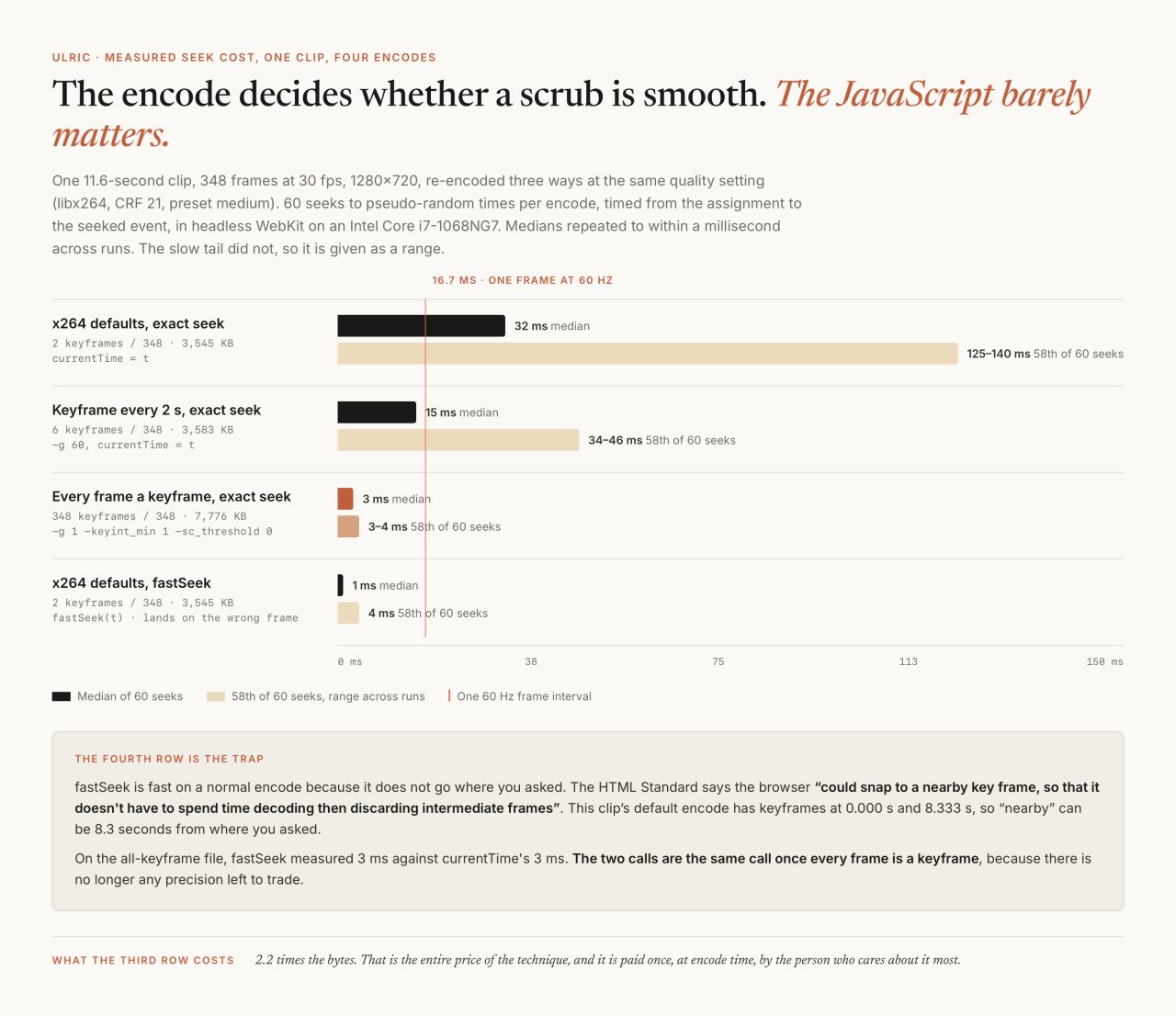
I wanted a number rather than a belief, so I took the 11.6-second film that runs on my featured card (348 frames, 30 fps, 1280×720) and re-encoded it three ways at identical quality settings: x264 defaults, a keyframe every two seconds, and every frame a keyframe. Then I drove 60 seeks to pseudo-random times at each file in headless WebKit through Playwright, timing from the assignment to the seeked event. The medians repeated to within a millisecond across separate runs. The slow tails did not: the worst seeks on the default encode moved between 125 and 140 milliseconds run to run, so treat the medians as the finding and the tails as an order of magnitude.

A median of 32 milliseconds against 3. The interesting row is the middle one: a keyframe every two seconds is a perfectly sensible web encode, and it still costs a median 15 milliseconds per seek, which is the entire 60 Hz frame budget spent moving one playhead. That gap, 15 against 3, is the twelve milliseconds in the first line of this post. The price of the fast row is bytes. The same eleven seconds went from 3,583 KB to 7,776 KB, about 2.2 times, and that is the whole cost of the technique. It is paid once, at encode time, by the person who cares about it most.
A wrong keyframe interval plays perfectly and only misbehaves when scrubbed, so the encode gets checked rather than trusted, the same habit that came out of an image pipeline that failed silently:
ffprobe -v error -select_streams v -show_frames \
  -show_entries frame=key_frame -of csv file.mp4 | grep -c 'frame,1'
That count has to equal the frame count. There are ten scrub files in the repo right now, five films at two widths each, and it does: 180, 348, 392, 414 and 531, every frame a keyframe in all ten.
Does fastSeek actually help?
On a correctly encoded file, no, and I have the measurement to say so about my own code. HTMLMediaElement.fastSeek() is the browser API that sounds like the answer to this entire problem. MDN's page for it carries a blunt warning: "This feature is not Baseline because it does not work in some of the most widely-used browsers." Firefox has shipped it since version 31 and Safari since version 8; no Chromium browser has ever implemented it. caniuse puts global support at 18.55%. The line in my loop is not an optimisation with a fallback, it is a Safari-and-Firefox branch that most visitors never take.
What it does when it is taken is spelled out in the HTML Standard, which defines fastSeek as an ordinary seek with the approximate-for-speed flag set:
For example, the user agent could snap to a nearby key frame, so that it doesn't have to spend time decoding then discarding intermediate frames before resuming playback.
Read that next to the encode above and the whole thing collapses. On my all-keyframe file, fastSeek measured a median 3 ms and currentTime measured a median 3 ms, because when every frame is a keyframe the nearest keyframe is the frame you asked for and there is no precision left to trade. On the default encode fastSeek was genuinely fast, a median of 1 ms, and useless: this clip's default encode has keyframes at 0.000 s and 8.333 s, so "nearby" can be more than eight seconds from where the scroll position said to go.
So fastSeek makes a badly encoded file seek quickly at the price of showing the wrong picture. The smoothness on my cards comes from the encode. The branch stays, because it costs nothing and it protects a file somebody else encoded, but I had been quietly crediting it for years.
Why put dead zones at each end of the travel?
Because a film that finishes as the card leaves is a film nobody saw finish. The card is its own scroll track: travel is the viewport height plus the card's own height, running from the moment its top touches the fold to the moment its bottom clears the top of the screen. Mapping the film across all of that would start it before the card was readable and end it after the card was gone.
So the first twelve percent and the last twelve percent hold a still, and the middle seventy-six percent carries the whole film. That is what (raw - 0.12) / 0.76 does, and the two numbers are not independent: 0.12 plus 0.76 plus 0.12 is exactly 1, so the last frame lands precisely as the trailing hold begins.

The model is proportional rather than fixed, which is why it survives a phone. On a short viewport with a tall card the holds shrink and the film reads faster, but the card still gets its full first and last frame on screen. Work it in pixels and the reason for the easing appears too: an 800 pixel viewport with a 300 pixel card gives 836 pixels of active travel for 348 frames, or 2.4 pixels of scroll per frame of film. One notch of a trackpad jumps several frames. Setting the playhead straight from scroll position would show every one of those jumps.
Hence current += (target - current) * 0.14, which moves the playhead fourteen percent of the remaining distance each frame rather than to the target. Half the gap closes in 4.6 frames, ninety percent in 15.3, so at 60 Hz a flick settles in about a quarter of a second of visible glide. The 0.0004 line underneath it snaps the last invisible sliver so the loop stops issuing seeks once the eye is done.
Why will iOS not seek a film it has never decoded?
This is the one I cannot fully source, so I will say what I know and where it stops. On iPhones, a scrubbed card that has never played will sit on its poster no matter what you assign to currentTime, until the page has seen a touch. The fix is one handler:
// iOS will not seek a video it has never decoded, so warm them on first touch
addEventListener('pointerdown', function warm() {
  films.forEach(function (f) {
    var p = f.play();
    if (p) p.then(function () { f.pause(); }).catch(function () {});
  });
}, { once: true, passive: true });
Play every film once inside the first real user gesture, pause it immediately, and every seek afterwards works. It has never failed in production and it costs one frame of decode.
What I can cite is the surrounding policy. The HTML Standard is explicit that the attribute I am relying on to have the film ready is only a suggestion: "The preload attribute is intended to provide a hint to the user agent about what the author thinks will lead to the best user experience. The attribute may be ignored altogether, for example based on explicit user preferences or based on the available connectivity." WebKit's new video policies for iOS, published 25 July 2016, set out what iPhones will do without a gesture, and it is narrow: inline playback for playsinline, autoplay only for video with no audio track, and playback paused again the moment the element is off screen.
The clearest statement Apple ever published of the rule I am actually working around says "preload and autoplay are disabled. No data is loaded until the user initiates it." That page was last updated on 13 December 2012, sits in Apple's archive, and predates two policy changes that superseded parts of it, so I will not present it as current behaviour. I have no current primary source for the seek-before-decode rule. I have a one-line handler, several years of it working, and an honest gap where a citation should be.
What does one frame of budget actually buy?
Not much, and the arithmetic is unforgiving. web.dev's rendering performance guide, written by Paul Lewis, puts it plainly: "Given that a typical display refreshes 60 times per second, some quick math would reveal that the browser has 16.66 milliseconds to produce each frame. In reality, though, the browser has its own overhead for each frame, so all of your work needs to be completed inside 10 milliseconds."
My products page carries four films at once, and this is where I had the arithmetic wrong before I measured it. A seek is not main-thread work, so four of them do not stack up inside one frame the way four layout reads would. I put four elements on one page seeking together and watched both clocks: the seeks finished at a median of 70 milliseconds of wall clock, while the gap between requestAnimationFrame callbacks held a median of 17 milliseconds and never went past 19. The page keeps painting at about sixty frames a second the whole time. What falls behind is the film. The playhead is answering a scroll position roughly four frames old, which reads as a picture lagging your thumb rather than as a page that stutters, and it is the same argument as putting twenty-eight thousand map pins on a phone: the operation is cheap and the count is what kills you.
So the encode is not buying me frames per second. It is buying me the difference between a film that tracks the scroll and one that arrives after it.
Which brings me to the two constants I got wrong. The seek gate is Math.abs(t - sought) > 0.004, four milliseconds of media time. At 30 fps a frame lasts 33.3 milliseconds, so that gate is an eighth of a frame: it lets through seeks that provably cannot change a single pixel. The number that matches the film is half a frame interval, 0.0167 at 30 fps. Second, 0.14 is applied per frame rather than per second, so on a 120 Hz phone the same constant settles in half the wall-clock time and the film feels twitchier than it does on my desk. The frame-rate independent form is 1 - Math.pow(1 - 0.14, dt * 60). Neither change is deployed as I write this, and I would not have found either without building the harness for this post.
There is also a tool I am not using. requestVideoFrameCallback fires when a new video frame is handed to the compositor, which is the only way to know a seek finished rather than assuming it. It reached Baseline on 29 October 2024 when Firefox 132 shipped, and caniuse puts it at 95.38%, five times the reach of fastSeek. A loop that waited for the frame would never queue a second seek while the first was still decoding. That is the next version.
When do I skip the video element entirely?
Most of the time, as it turns out. There are twelve demo pages in this repo. Eleven contain no <video> element at all, and the twelfth uses one as a webcam feed. Every scrub on those pages is a canvas: WebP stills preloaded behind an honest progress bar, then drawImage at whatever index the scroll position picks. Seeking becomes an array lookup, which costs nothing and never stutters.
The tradeoff is where the cost lands. A roofing demo holds 145 frames at 1080×598, 9,156 KB, before the first scroll, and its phone tier is 820×454 and 6,968 KB. All of it has to arrive before anything moves, which is why those pages show a real percentage while they load. Video streams instead, so it starts sooner and costs less memory, and it can only be seeked as fast as its keyframes allow.
| Video element | Canvas frame sequence | |
|---|---|---|
| Seek cost | 3 ms measured, encode-dependent | An array index |
| Start | Streams, starts on metadata | Every frame first, behind a loader |
| Memory | One decoder | Grows with frame count and frame size |
| iOS | Needs the gesture warm-up | Nothing special |
| Good for | Cards, banners, several at once | One full-screen hero that must not miss |
The memory column is the one to respect. A 1080×598 frame is 2.58 MB decoded, so 145 of them held decoded at once would be 374 MB. Browsers do not necessarily keep them all decoded and I have not measured what iOS actually retains, so treat that as arithmetic rather than a measurement. It is still the reason phones get their own lighter frame set on every page that does this.
The films themselves come from a recorder rather than a screen capture. tools/record_procedural_world.py drives a page in WebKit with the clock frozen, advancing window.__t by exactly 1/30 of a second and screenshotting between two animation frames, so frame 200 is identical on every run regardless of what the laptop was doing. That determinism is what lets a procedural world drawn in code become a scrub film at all.
What generalizes out of this
Three things, and only the last one is about video.
- When an API and a file format both claim to solve a problem, measure which one is doing the work. I had a browser-specific branch in my code that I believed was carrying the smoothness, and three ffmpeg flags that actually were.
- A constant in an animation loop is a claim about time. Every per-frame multiplier is secretly a claim that the display runs at 60 Hz, and every threshold is a claim about what the eye can be shown. Both are checkable, and mine were off by an eighth of a frame and by a factor of two.
- The cheap operation times the count is the real number, and the number only means something once you say which clock it spends. Four seeks at three milliseconds cost me almost nothing on the main thread and still decide whether the film arrives with the scroll or after it.
The threshold change is a one-line edit I have not shipped yet, because I want to watch the 120 Hz version of the easing on a real phone first, and the only 120 Hz phone I can test on is not mine.
Common questions
Why does my scroll-scrubbed video stutter?
Almost always the encode, not the JavaScript. Seeking a normal H.264 file makes the decoder start at the last keyframe and decode every frame in between. On one 11.6-second clip I measured a median seek of 32 ms at x264 defaults and 15 ms with a keyframe every two seconds, against a 16.7 ms budget for the whole frame. Re-encoding with every frame a keyframe took it to 3 ms.
Should I use fastSeek for a scroll scrub?
It will not hurt, and it is probably not helping. No Chromium browser implements fastSeek, so caniuse puts global support at 18.55%. On a file where every frame is a keyframe it measured the same 3 ms as setting currentTime, because there is no precision left for it to trade away.
How do I encode a video so it can be scrubbed?
Make every frame a keyframe: -g 1 -keyint_min 1 -sc_threshold 0, with -pix_fmt yuv420p and -movflags +faststart, at 1440 pixels wide or less. Then verify rather than assume, because a wrongly encoded file plays perfectly and only misbehaves when scrubbed. Count keyframes with ffprobe and confirm the count equals the frame count.
Why does my scrubbed video not move on iPhone?
On iOS a video that has never been decoded will ignore assignments to currentTime and sit on its poster. Playing every film once inside the first pointerdown and pausing it immediately fixes it. The HTML Standard is clear that preload is a hint a browser may ignore altogether, so nothing about the loaded state can be assumed.
Is a canvas image sequence better than a video element?
For one full-screen hero that must never stutter, yes: seeking becomes an array lookup. The cost is that every frame has to arrive before anything moves, so those pages need a real progress bar, and memory grows with frame count and frame size. For several scrubs on one page, a properly encoded video is lighter.
Related