Insights
Claude Code hooks: the guardrails that never ask the model
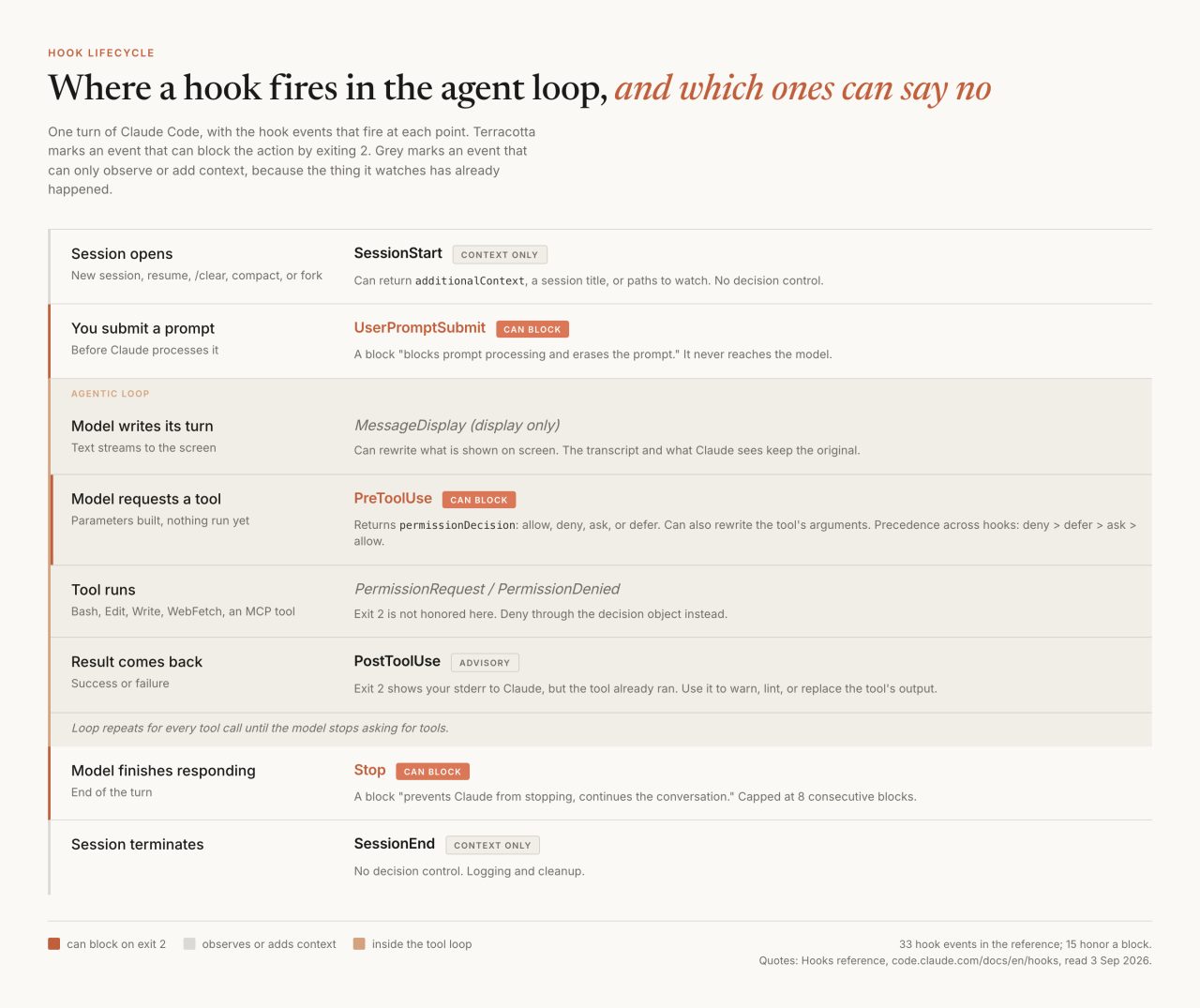
A model can be argued with. It can be worn down by a long context window, swayed by text it read in a file, or simply wrong at one in the morning. Claude Code hooks are the part of the harness that cannot be argued with: small programs that run at fixed points in the agent loop, read the event as JSON on stdin, and hand back a decision the model gets no vote on. I run two of them on every session. Neither one exists because Claude is careless.
What is a Claude Code hook?
A hook is a shell command that Claude Code runs at a named point in its own lifecycle. It can also be an HTTP endpoint, an MCP tool call, or a prompt sent to a small model, but the shell command is the one you will write first. Anthropic's hooks guide states the value in a sentence:
Claude Code runs them at specific points in its lifecycle, which gives you deterministic control: certain actions always happen rather than relying on the LLM to choose to run them.
Most advice about agent guardrails is really advice about prompting. Hooks are the other kind, and the difference is worth sitting with, because the first instinct is usually to write the rule into CLAUDE.md instead. A rule in a markdown file is read by a model that then has to choose to follow it, on turn forty, behind a hundred thousand tokens of other material. When I measured a week of my own transcripts, 75% of the spend was cache reads on requests above 250k tokens of context. Long sessions are exactly where an instruction from turn one has the most competition. Ran Isenberg put the distinction cleanly in a June 2026 piece on deterministic AI guardrails: "Everything you feed an LLM-based agent through its context window is, in the end, a suggestion." A hook is a subprocess. It runs.
I have written before about the files that keep AI slop out of my projects, and the division of labor there still holds. Law files teach judgment. Hooks enforce the parts of the law that have an exact yes-or-no answer, because a script does not get tired at the end of a long session.
Where do hooks fire in the agent loop?
At thirty-three named points, in the hooks reference as I read it on 3 September 2026, but they fall into three cadences that fit in your head. The docs call this the hook lifecycle and list the spine of it plainly:
once per session:
SessionStartandSessionEnd; once per turn:UserPromptSubmit,Stop, andStopFailure; on every tool call inside the agentic loop:PreToolUseandPostToolUse[...]
Everything else branches off that spine: the permission events beside a tool call, subagent start and stop, compaction before and after, file-change and worktree and model-switch events off to the side. Fifteen of the thirty-three honor a block. The rest can only watch, or add context. One exception: PermissionRequest denies through its decision object rather than by exiting 2.

One caveat belongs here rather than in a footnote. PreToolUse fires only when the model calls a tool. Files you pull in with an @ reference are inserted while the prompt is being built, so no hook fires for them, including hooks matching Read. If a path needs to be off limits, that is a permission deny rule, not a hook. A hook gates actions. It does not gate everything that reaches the context window.
What can a hook see, and what can it return?
Every hook receives a JSON object on stdin carrying session_id, cwd and hook_event_name, plus permission_mode on the events that receive it, and whatever fields the event adds. A PreToolUse hook on a Bash call gets this:
{
  "session_id": "abc123",
  "cwd": "/home/user/my-project",
  "permission_mode": "default",
  "hook_event_name": "PreToolUse",
  "tool_name": "Bash",
  "tool_input": { "command": "npm test", "timeout": 120000 },
  "tool_use_id": "toolu_01ABC123..."
}
Answering is where the contract gets sharp edges. Most events that can block use a top-level decision of "block" with a reason. PreToolUse is the one people get wrong, and it is not alone: PermissionRequest, Elicitation and PreModelSwitch each answer their own way. Its decision goes inside hookSpecificOutput as a permissionDecision of allow, deny, ask, or defer, alongside a permissionDecisionReason. When several PreToolUse hooks disagree, precedence runs deny, defer, ask, allow.
The third channel is additionalContext, a string your hook injects into the conversation wrapped in a system reminder. The docs give advice about it that is easy to skip and expensive to learn twice: write it as factual statements rather than imperative system instructions, because text framed as an out-of-band command can trip Claude's own prompt-injection defenses and get surfaced to you instead of used. Hook output strings, including that one, are capped at 10,000 characters.
Which exit code actually blocks?
Exit 2, and only exit 2. This is the most useful fact on the page, and the docs flag it with a warning because it runs against every Unix habit you have:
For most hook events, exit code 2 is the only exit code that blocks through the code alone. Without valid JSON on stdout, Claude Code treats exit code 1 as a non-blocking error and proceeds with the action, even though 1 is the conventional Unix failure code.
What a block means depends on the event. On PreToolUse it blocks the tool call. On UserPromptSubmit it "blocks prompt processing and erases the prompt". On Stop it "prevents Claude from stopping, continues the conversation". On PostToolUse it blocks nothing at all, because the tool has already run; your stderr simply gets shown to Claude as a warning.

A gate fails open in two ways, and both are worth triggering on purpose the first time you install a policy hook. A hook whose path is mistyped or that is not executable exits 127, which lands in the non-blocking bucket, so the session runs exactly as if the gate were not there. And a PreToolUse command hook that hits its timeout does not block either: the reference says outright not to count on a stalled hook to act as a gate.
The guard that reads my prompt before Claude does
My keyboard has a hardware quirk. Certain keys occasionally repeat, and the space bar sometimes fires in bursts. Most of the time that produces an obvious typo. Once in a while it produces a sentence in which every word is real and the meaning is not the one I typed, which is a worse outcome when the next item on the list is a deploy. On 20 July 2026 I stopped relying on catching those by eye and wrote the check as a hook.
The wiring, from ~/.claude/settings.json:
"UserPromptSubmit": [
  {
    "hooks": [
      {
        "type": "command",
        "command": "/Users/eric/.claude/hooks/garbage-input-guard.py",
        "timeout": 10,
        "statusMessage": "Checking prompt for keyboard garble"
      }
    ]
  }
]
The script is about fifty lines of Python with no dependencies. It reads the prompt off stdin and looks for three signatures: a run of eight or more of the same letter, runs of four to seven, and three or more spaces inside a line. Multi-line pasted content gets lenient treatment, because aligned code and tables legitimately contain runs of spaces, and a false positive on a paste costs more than a miss.
A hard match returns a block, which per the reference erases the prompt before the model sees it:
{
  "decision": "block",
  "reason": "Keyboard-garble guard: this prompt looks like stuck-key input (repeated characters or space bursts). Nothing was sent to Claude. Please retype the message."
}
A soft match does not block. It sends me a one-line systemMessage and sends Claude an additionalContext string:
{
  "systemMessage": "Keyboard-garble guard: prompt looks partially garbled; Claude will confirm before any destructive action.",
  "hookSpecificOutput": {
    "hookEventName": "UserPromptSubmit",
    "additionalContext": "SAFEGUARD: This prompt shows signs of a malfunctioning keyboard (stuck-key repeats or space bursts). Treat its wording as unreliable. Restate your interpretation, and do NOT run destructive, irreversible, or outward-facing actions (deletes, force-pushes, deploys, bulk edits) without explicit confirmation first."
  }
}
The soft path is the half that earns its keep. A garbled prompt is dangerous when it still reads fine; the unreadable ones I catch myself. Piping deploy the site through the guard while writing this returned the soft flag, and deploy the siiiiiiiiiite now returned the block. Only one of those two looks like a problem on screen.
One sizing note. UserPromptSubmit hooks default to a 30-second timeout for command handlers, much shorter than the 600-second default on most events, because this hook blocks model processing until it returns and a stuck one stalls the session. Mine is set to 10 and does nothing but run a few regular expressions over a string.
The session hook that hands me my own reading list
The second hook I run is not a guardrail at all, which is worth saying out loud: the same mechanism that blocks things is also the cheapest way to put a fact in front of an agent at the exact moment it matters.
I text myself links to posts about agent workflows, dozens of them, and they pile up in a message thread where they do nobody any good. A SessionStart hook runs one read-only count against my local message database and reports how many are recent:
ROWS=$(sqlite3 -readonly "$DB" "
SELECT COUNT(*) FROM message m
JOIN chat_message_join j ON j.message_id = m.ROWID
JOIN chat c ON c.ROWID = j.chat_id
WHERE c.chat_identifier = '+1XXXXXXXXXX'
  AND m.is_from_me = 1
  AND (m.text LIKE '%x.com/%' OR m.attributedBody LIKE '%x.com/%')
  AND m.date/1000000000 + 978307200 > strftime('%s','now') - 14*86400;")
Then it prints a SessionStart object whose additionalContext gives Claude the count and tells it how to digest anything newer than the memory file holding the last pass. Running the hook while writing this returned 22.
Three choices in that short script matter more than the SQL does. It is stateless: it always reports the last fourteen days and lets the digest deduplicate, so there is no state file to corrupt. It is read-only, and the grant that allows it is recorded in my settings rather than assumed. And it exits silently when the database is unreadable or the count is zero, because a hook that speaks up with nothing to say trains you to ignore it. SessionStart cannot block anything; the decision table lists it as context only, which is the right shape for this job. It is the same idea behind the harness reading my texts, moved to the moment a session opens.
How do you gate a destructive command?
With PreToolUse, a matcher on the tool, and a permissionDecision of deny. The reference's own example narrows twice, first to the Bash tool and then to Bash subcommands matching rm *, so the script only spawns when both filters match:
"PreToolUse": [
  {
    "matcher": "Bash",
    "hooks": [
      {
        "type": "command",
        "if": "Bash(rm *)",
        "command": "${CLAUDE_PROJECT_DIR}/.claude/hooks/block-rm.sh"
      }
    ]
  }
]
and the script it spawns answers with a denial:
{
  "hookSpecificOutput": {
    "hookEventName": "PreToolUse",
    "permissionDecision": "deny",
    "permissionDecisionReason": "Destructive command blocked by hook"
  }
}
I have not wired that one, and I would rather say so than imply a tidier setup than I have. The two hooks above are what actually runs on my machine today. The deploy gate exists as a written rule in the project playbook, not yet as a script: block a deploy unless the working copy passed lint and the live-verify step, refuse commits that add secrets or generated configs, run the security checklist after every deploy, reject public copy carrying an em dash or an emoji. Every one of those is a yes-or-no question, which is another way of saying every one of them is a hook I have not written.
The verification half of the pattern is the Stop hook. Blocking at Stop keeps the turn alive and hands your reason back to the model, which is how "did you actually run the test suite" becomes a property of the loop instead of something you remember to ask. It ships with its own loop protection: the input carries a stop_hook_active flag, and Claude Code overrides the hook and ends the turn after eight consecutive blocks. That ceiling is the whole difference between a verification gate and an agent that will not stop talking, and it matters more than it sounds when you are running generate, deploy, verify loops unattended.
What earns a hook
A rule with an exact answer and a cost you do not want to pay twice. Everything else stays in the law files, where judgment belongs. Isenberg's advice lands in the same place: protect the critical guardrails, the destructive commands and the secrets and the standards that cannot slip, and leave the rest to prompts.
Two cautions before you go and install a dozen. Command hooks execute with your full user permissions, and workspace trust is asymmetric. An interactive session holds hooks back until you accept the trust dialog, but a -p or SDK session "never shows the dialog and treats the folder as trusted, so hooks committed in a repository's .claude/settings.json run in a folder you've never trusted." If you script claude -p across a repo you did not write, read its .claude/ directory first, or start it with --settings '{"disableAllHooks": true}'.
The other caution is that a hook is not a defense against prompt injection. It narrows what an agent can do; it does not make the model trustworthy. Simon Willison's post on the lethal trifecta, from June 2025, is still the clearest statement of why. He is "deeply suspicious" of guardrail products that claim to catch "95% of attacks", because "in web application security 95% is very much a failing grade." A deterministic gate is worth having precisely because its number is 100 for the exact string you matched and 0 for everything you did not think of. Hooks, permission rules, and a small blast radius are three angles on one job, which is the subject of the wider agent harness anatomy.
The next hook I want is a boring one: a PostToolUse match on Write and Edit that greps whatever I just wrote for an em dash and hands it straight back. That rule has been sitting in a markdown file since July. The file gives excellent advice and has never once stopped anything.
Common questions
What is a Claude Code hook?
A hook is a shell command (or HTTP endpoint, MCP tool call, or prompt) that Claude Code runs at a named point in its lifecycle. It reads the event as JSON on stdin and answers with an exit code or a JSON object. The official guide describes it as deterministic control: certain actions always happen rather than relying on the model to choose to run them.
Which exit code blocks a tool call?
Exit 2, and only exit 2. The docs warn that without valid JSON on stdout, exit code 1 is treated as a non-blocking error and the action proceeds, even though 1 is the conventional Unix failure code. A hook whose path is mistyped exits 127, which also fails open, so test a policy hook the first time you install it.
Can a hook stop Claude from finishing a turn?
Yes. A Stop hook that exits 2 or returns decision "block" prevents Claude from stopping and continues the conversation with your reason handed back to the model. It has loop protection: the input carries a stop_hook_active flag, and Claude Code overrides the hook and ends the turn after eight consecutive blocks.
Do hooks protect against prompt injection?
No. A hook narrows what an agent is allowed to do; it does not make the model trustworthy. PreToolUse also fires only when the model calls a tool, so files pulled in with an @ reference never trigger it. Use permission deny rules for paths, and treat hooks as one layer among several.
Where do you configure hooks?
In JSON settings files: ~/.claude/settings.json for all your projects, .claude/settings.json for one project (shareable in the repo), .claude/settings.local.json for machine-local settings, plus managed policy settings, plugins, and skill or subagent frontmatter. Entries merge across levels rather than replacing each other.
Related