Insights
Procedural geometry vs Blender MCP: where I drew the line
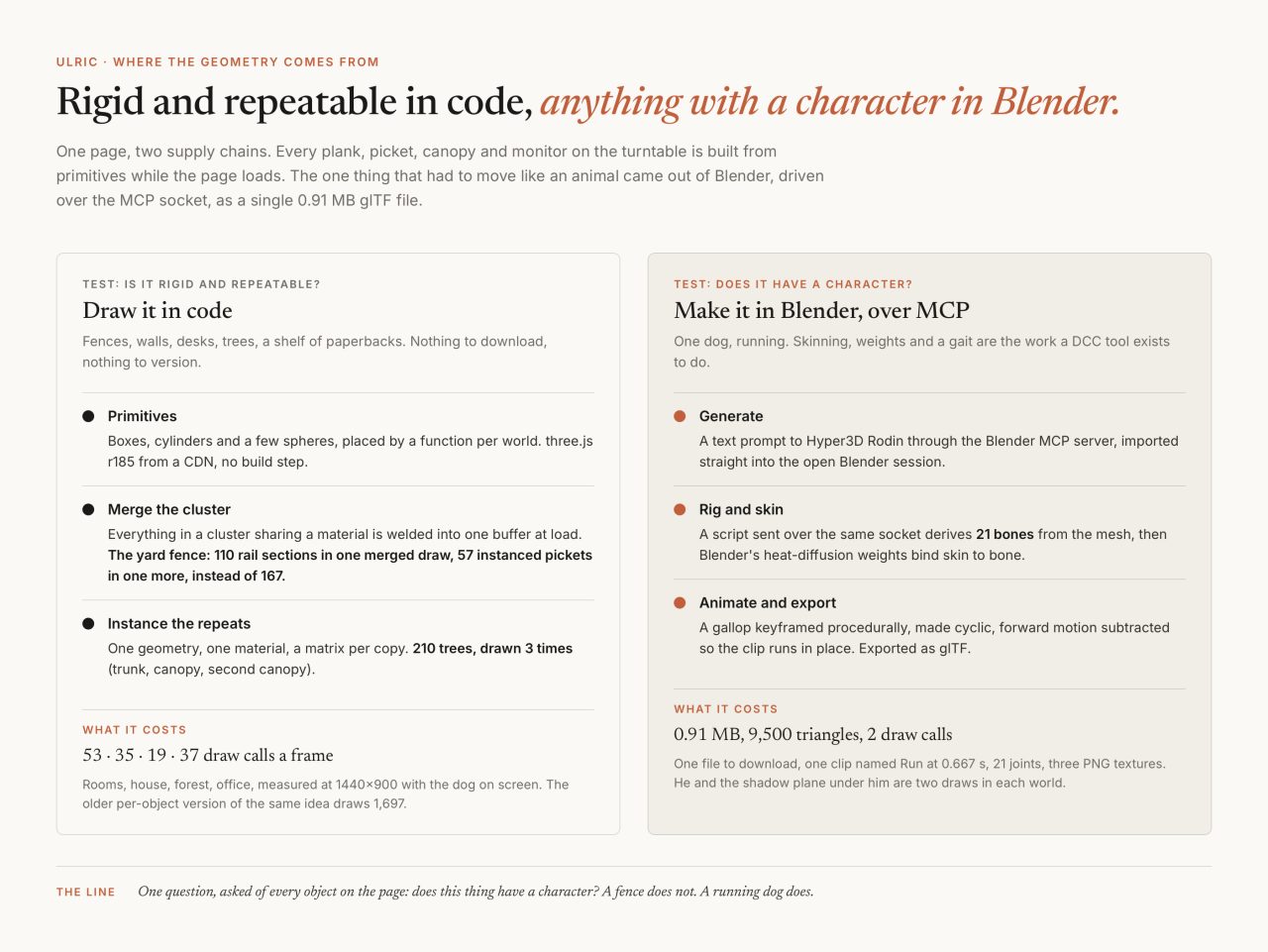
A web page that needs a 3D scene has two ways to get one. Draw the geometry in code, out of boxes and cylinders, and let the GPU build it in microseconds. Or model it in a tool, export a file, and send that file to every visitor. Blender now has a community MCP server, so an agent can drive the tool about as well as a person can, which changes the price of the second option enough to be worth re-asking the question. I rebuilt my procedural world demo and used both, deliberately, in the same page.
The answer fits in one sentence. Everything rigid and repeatable was cheaper in code; the one thing that had to move like an animal was only possible through Blender, and MCP turned that from an afternoon of clicking into a script I can re-run.
What the demo is
One HTML file, 1,563 lines, 75 KB, three.js r185 straight off a CDN with no build step. Four worlds share one brass turntable: a living room, a house with a fenced yard, a forest, an office floor. Switching between them runs a 2.7 second reshape, the old world sinking as the new one rises, with the ground blending planks, lawn, leaf litter and carpet inside a single shader. Running through all four is a grey pit bull called Ronin, after my old dog, and he is the only thing on the page that was not written as code.

When is code the right place to build 3D geometry?
When the thing is rigid and repeatable, which covers almost everything in an architectural scene. A fence is a picket repeated fifty-seven times. A forest is a tree repeated two hundred and ten times. None of that needs an artist, and none of it needs to cross the network, because the description is shorter than the result.
The cost that matters is draw calls, the number of times a frame the CPU stops and asks the GPU to draw something. I measured it from outside the page rather than letting the page report on itself: a script wraps drawElements, drawArrays and their instanced forms on both WebGL context prototypes and tallies them between animation frames. Same yardstick everywhere.
morphing-rooms   1697 calls/frame   (293 frames, min = max)
procedural-world   53   rooms
                   35   house
                   19   forest
                   37   office
                  156   peak, mid-reshape, both worlds on screen
The 1,697 is my earlier morphing rooms demo, adapted from home-sweet-home by Techartist under the MIT licence. It draws every object separately, which is the honest way to write a first version. The rebuild draws the same kind of scene about thirty times cheaper, and the difference is two techniques.

What merging and instancing actually buy
Merging comes first. Every world is a set of clusters, a sofa, a porch, a fence, a row of desks, and at load time everything in a cluster that shares a material is welded into one buffer with BufferGeometryUtils.mergeGeometries, documented as merging "a set of geometries into a single instance" where "all geometries must have compatible attributes." The yard fence is 57 pickets and 110 rail sections, and it costs two draws instead of 167: one merged buffer for the rails, one instanced draw for the pickets.
Instancing handles the rest. Anything that appears more than a handful of times becomes an InstancedMesh, which three.js documents plainly:
Use this class if you have to render a large number of objects with the same geometry and material(s) but with different world transformations. The usage of 'InstancedMesh' will help you to reduce the number of draw calls and thus improve the overall rendering performance in your application.
The forest is 210 trees on a laptop and 130 on a phone, drawn three times: trunks, first canopy, second canopy. During a reshape each copy carries its own start time, so the trees grow outward from the path rather than arriving all at once, which costs nothing, because an offset per instance is one more number in the same buffer.

What is the Blender MCP server?
A community plugin that lets a language model operate Blender. The Model Context Protocol is "an open-source standard for connecting AI applications to external systems", and blender-mcp is one of those connections: MIT licensed, created in March 2025, carrying 26,750 stars on 4 September 2026.
It has two halves. An addon runs inside Blender and opens a socket server on port 9876; a separate Python process implements MCP and forwards commands to it. The tools are the useful ones: read the scene, read one object, take a viewport screenshot, run arbitrary Python, pull assets from Poly Haven, Sketchfab and Poly Pizza, and generate models with Hyper3D Rodin or Hunyuan3D. The project is direct about the risk in that list:
The
execute_blender_codetool allows running arbitrary Python code in Blender, which can be powerful but potentially dangerous. Use with caution in production environments. ALWAYS save your work before using it.
That is a real gate, and it lands where the harness anatomy post lands: a tool that can execute anything gets pointed at a scratch file, never at the only copy of your work. For the long scripts I skipped the model and sent Python straight into the socket the addon was already listening on, which is fifty lines of code and no tokens.
Generating a dog, three times over
Rodin takes a sentence and returns a textured mesh. Through the MCP server the call is small, and the one argument worth understanding is the bounding box:
generate_hyper3d_model_via_text(
  text_prompt   = "a pit bull standing squarely on four straight
                   legs, A-pose, side profile",
  bbox_condition = [1, 0.4, 0.62]
)
Those three numbers are a ratio of length to width to height rather than measurements, because as the tool's documentation says, "the generated model has a normalized size, so re-scaling after generation can be useful." Hyper3D advertises free credits and does not publish the limit, and the addon ships a shared trial key rather than a per-account one, so I have no honest number for how far the free tier goes.
Three times the pipeline went backwards. First I fed it the photograph I have of Ronin. He is lying down in it, so image-to-3D returned a dog lying down, faithfully, and there is nothing in a lying dog to rig for a run. Second, the text prompt came back in a play-bow, front down and rear up, a charming pose and a useless one; I rewrote it to say "standing squarely on four straight legs" and ran it again. Third, at the size the page draws him, the grey brindle coat and a long curled tail read as a tabby cat, and a regeneration for a solid coat came back in a play-bow again.
At that point I stopped asking the generator and fixed the mesh instead. A script shortened and lowered the tail, weights untouched, and a texture pass pulled the mid-grey fur toward one slate tone, both inside the same open Blender session. Then I gave him his real coat: from photographs of the actual dog, a script baked where every texel sits on the body and painted from that, white base, a taupe merle saddle over the back and flanks, taupe thighs and tail, a grey cap over the ears with a patch round each eye and a white blaze. The nose and eyes came from the generated texture. That is the part of the workflow I would keep. The generator is good at producing a plausible animal and bad at taking direction, and a scripted repair on an accepted mesh beats a fourth roll of the dice.

What I did not fix: a faint second tail overlapping the first, and a small nub under the belly. The mesh is unwelded triangle soup, so neither is a separable component, and at demo scale neither is visible. Deciding what to accept is the judgment call from the post on keeping slop out of my projects. Generated output is a draft, and somebody still has to look at it.
What does automatic rigging actually do?
Two things worth separating. An armature is a skeleton, a tree of bones you can pose. Skinning is the map from bones to surface, a weight per vertex saying how much each bone moves it. Posing a skeleton is easy. Writing the weights by hand is the part nobody wants to do.
My rig script assumes nothing about the dog. Heading, body axis, scale, ground plane and every bone position come from measuring the geometry, which is why it worked on a second pit bull without editing. It builds 21 bones: root, hips, spine, chest, neck, head, three per leg, three in the tail. No jaw or ear bones, because those need landmarks that differ per mesh and would let the weights bleed across the muzzle.
The weights come from Blender's automatic option, which is a nineteen-year-old idea from Baran and Popovic's Automatic Rigging and Animation of 3D Characters at SIGGRAPH 2007, and their description of it has never been improved on:
Suppose we treat the character volume as an insulated heat-conducting body and force the temperature of bone i to be 1 while keeping the temperature of all of the other bones at 0. Then we can take the equilibrium temperature at each vertex on the surface as the weight of bone i at that vertex.
Heat flows around geometry rather than through the air, which is why a proximity rule welds part of the torso to a foreleg and this does not. On a generated mesh it still leaves some vertices at zero, so the script sweeps those up with a nearest-bone fallback. I also stopped forcing the rest pose symmetric: these meshes are not mirror-symmetric, and mirroring the bones pushed a foreleg bone outside its own leg. The bones sit on each leg's own centre line, and the animation is mirrored instead, which is what reads on screen.

How do you keyframe a run you can trust?
By writing it as a formula and then checking it against the ground. The Run clip is a gallop with a flight phase, keyframed over 16 frames at 24 frames a second and closed into a loop with cyclic F-curve modifiers, so the last frame hands back to the first without a seam. The feet are solved with two-link inverse kinematics against an authored foot path: flat through the stance, lifted and swung through the rest.
Then the forward travel is subtracted before export, so the clip runs on the spot. A clip that carries its own translation fights whatever the page wants to do with position, and this page wants to move him along a curve at its own speed. The animation supplies the gait; the page supplies the journey.
The run that produced this rig logged a worst inverse-kinematics miss of 0.11 m at full scale, with one toe dipping 5.7 cm below the ground at the extreme of the push. I accepted both: the beat is exact, the slip does not read at the size he is drawn, and chasing a perfect solve on a mesh this rough would have been vanity. Looking, then deciding out loud, is the loop from the post on agentic loops in production.

The contract the page actually depends on
Not the blend file, not the rig, not Blender. Eight numbers and a clip name:
pitbull.glb   951,916 bytes (0.91 MB)
              9,500 triangles, 21 joints, 3 PNG textures
              1 clip: "Run", 0.667 s, 17 samples, cyclic
              0.60 m tall, feet at y = 0
              +Y up, faces -Z
Those last two lines cause more wasted afternoons than the rest combined. The glTF 2.0 specification is precise: "glTF uses a right-handed coordinate system. glTF defines +Y as up; the front side of a glTF asset faces +Z, the left side of a glTF asset faces +X", and "the units for all linear distances are meters." Blender is Z up and its exporter rotates the scene on the way out, so a decision made in one axis convention arrives in another.
My dog faces the opposite way from that convention and I left him there, because the page reads the tangent of his path every frame and turns him to face it, so his authored heading is overwritten before anyone sees it. What matters is that the number is written down where both ends can read it. The failure mode raises nothing at all: it just runs the dog backwards, which you notice on about the third viewing.
The page loads him once with GLTFLoader, plays the clip through an AnimationMixer, and drives him along a CatmullRom curve per world: around the yard, along the forest path, down the office aisle. He is scaled per world too, 0.95 in the living room and 0.68 in the forest, because a dog sized against a sofa is a giant next to a tree.
He costs two draw calls, his skinned mesh and the soft shadow plane under him: hiding the mesh alone takes the four worlds from 53, 35, 19 and 37 down to 52, 34, 18 and 36. The 0.91 MB is the real price, and it is the only download the page makes beyond the library. If it had to be smaller, Draco geometry compression and KTX2 textures through Basis Universal are the levers, both with loaders that ship with three.js. I used neither, because one megabyte for a page's only asset is not yet a problem.

Where the line falls
The question I ended up asking of every object on the page was whether it has a character.
A fence does not. Nor does a desk, a monitor, a canopy or a kitchen wall. Pushing those through Blender would mean shipping megabytes of vertex buffers for shapes the GPU assembles in microseconds, and it would put the merging and instancing decisions in the wrong place, because whether the forest is 210 trees or 130 depends on the device, and only the runtime knows that.
A running dog does have a character. A rigid procedural dog is easy and would look like a toy; a dog that runs is skinning, weights and a gait, which is the work a modelling tool exists to do. What the MCP server changed is that I did it by writing and re-running a script instead of by clicking, so when the coat came out wrong I could re-export in a minute.

The one measurement I keep coming back to is the 53. A living room of furniture, walls, a rug and a full bookshelf, and the busiest world on the page asks the GPU to draw fifty-three things. The dog and his shadow are the last two. He is also the only part of it I could not have written.
Common questions
When should you build 3D geometry in code instead of Blender?
When the thing is rigid and repeatable. Fences, walls, desks, monitors and trees are describable in a few lines, so drawing them from primitives ships nothing over the network and leaves the merging and instancing decisions in the runtime, which is the only place that knows what device the page is on. Anything with a character, meaning something that has to move like a living thing, belongs in a modelling and animation tool.
What is the Blender MCP server?
A community plugin, MIT licensed, that lets a language model operate Blender. An addon runs a socket server inside Blender on port 9876, and a separate Python process implements the Model Context Protocol and forwards commands to it. The tools include reading the scene, taking a viewport screenshot, running arbitrary Python, downloading assets from Poly Haven, Sketchfab and Poly Pizza, and generating models with Hyper3D Rodin or Hunyuan3D. The project warns in writing that the arbitrary-code tool is dangerous and to save your work first.
How do merging and instancing reduce draw calls?
Merging welds every object in a cluster that shares a material into one buffer at load, and instancing draws one geometry many times with a matrix per copy, so a yard fence of 110 rail sections and 57 pickets costs two draws instead of 167 and a forest of 210 trees costs three. Measured from outside the page by counting real WebGL draw commands, the four worlds cost 53, 35, 19 and 37 calls a frame, against 1,697 for an earlier demo that drew every object separately.
What does a web page actually need from a glTF file?
A contract, not a blend file. For this build it is the file size, the triangle count, the joint count, one clip name and duration, the height in metres, and the axis convention: +Y up, feet at y = 0, and which way the model faces. The glTF specification defines +Y as up and says the front of an asset faces +Z, while Blender is Z up and its exporter rotates the scene on export, so the failure mode raises no error at all: the character simply runs backwards.
Can an AI generate a rigged, animated character?
It can generate the mesh. Hyper3D Rodin returned a textured pit bull from a sentence, but it took three attempts: image-to-3D of a photograph returned a dog lying down because that is what the photograph showed, and two text generations came back in a play-bow. The rig, the skinning and the gait were scripted in Blender afterwards, using heat-diffusion automatic weights and a keyframed run cycle, and the accepted mesh was repaired by script rather than regenerated.
Related