Case study
Clip Calendar: a posting plan that waits for a yes
A clip scheduler for creators and small brands, with calendars, captions, a keyboard review queue and share links. Nothing is ready to post until a person approves it, and it never posts on its own.
Why I built it
Some of my studio work is short vertical video. My Reel Creator turns a clip into a finished vertical reel, but the plan for which clip goes out when, for which brand, lived somewhere else. Clip Calendar is a general version of a real page that tracked short vertical clips across brands, with a posting calendar by series. I rebuilt it so the approval step is part of the tool.
I wanted one rule built in from the start: nothing is ready to post until a person says yes. Clip Calendar does not publish to Instagram, TikTok, YouTube or Facebook. It plans, it collects approvals, and it exports.
What it does
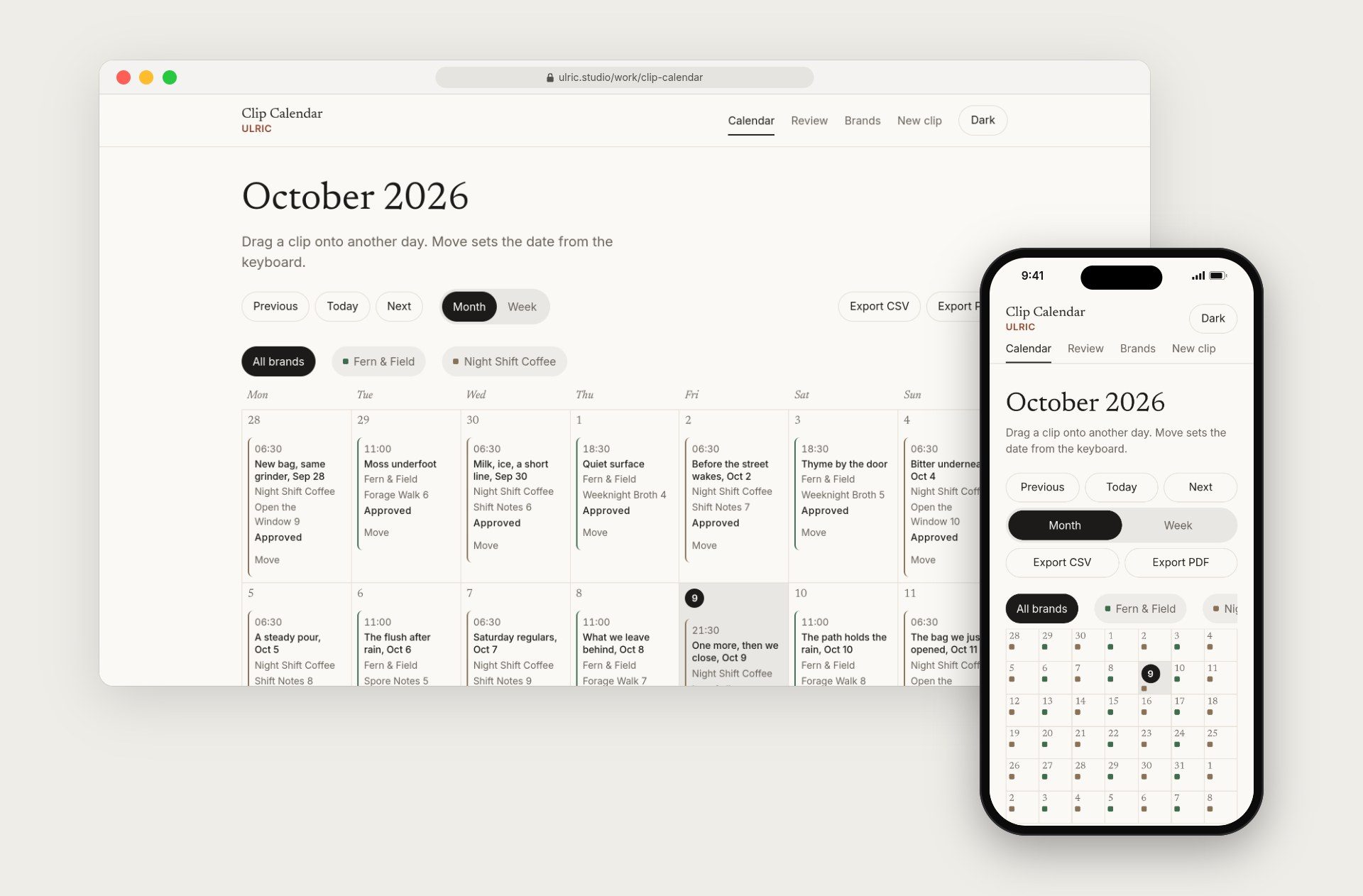
Each brand has a name, a color, handles, default hashtags, a posting cadence and a map pin. The demo pins are fictional. There are month and week calendars for one brand or for all of them, and you can drag a clip to another day to reschedule it.
A clip can be an upload or a link to an existing video. Each clip has a caption, hashtags, platform targets (IG Reels, TikTok, YT Shorts and FB), a series and part number, a post date and time, and a flag for whether it is fine for stories. It also has a comment thread and a status history.
Review mode is built for going through a queue quickly with the keyboard. J and K move through clips, A approves, H holds, R sends a clip back to review and D returns it to draft. The schedule exports as CSV or PDF, for all brands or one. A brand, a date range, or both can be shared through a read-only link that asks search engines not to index the page.
The demo has two made-up brands, Fern & Field and Night Shift Coffee, with a three-month schedule. On my install that is 91 clips. The sample clips and photos are free-license files, and each one is credited with its source and license.
How it's built
The API is ASP.NET Core 8 and the front end is Angular 22 with standalone components and signals. EF Core stores data in SQLite, or in MySQL through Pomelo. QuestPDF writes the schedule PDF, Chart.js draws the status and brand counts, Leaflet shows the brand pins, ffmpeg and ffprobe handle media, and three.js is used for the week view only.
Approval is a state machine
The approval rules live in the domain layer, which does not depend on the web host, so they can be tested on their own. A clip moves from draft to needs review. From needs review it can be approved, put on hold, or sent back to draft. A held clip can go back to needs review or to draft. An approved clip can be sent back to review. A clip cannot jump from draft straight to approved. Every move is written to the clip's history with who made it and when.
Media never blocks the page
When a video is uploaded, the original is saved and never changed. A background worker runs ffprobe to read the file, writes a 9:16 JPEG thumbnail, and writes a separate preview only when a trim, or a source that is not already 9:16, needs one. The seeded clips ship with their previews and posters, so the first load does not wait on ffmpeg. If ffmpeg is not installed, the upload still works and a banner on the calendar says thumbnails and trims are paused.
Share links are scoped
A share link is 32 random bytes, encoded as base64url. It can be limited to a brand, a date range or both. The public endpoint returns only the clips inside that scope, and an unknown token gets a 404. The share page itself is an Angular route, so on my Mac it is served by the same fallback that serves every other page of the app. Sending that path to the API instead would have broken it, which came up while I was setting up the proxy.
The xUnit suite has 32 tests. They cover schedule ranges and moves, CSV columns and escaping, relative clip URLs, approval transitions, share-token scope including the 404, and a check that the MySQL migration never uses a MySQL 8-only collation.
What I learned
Check the production build, at the real path, before believing anything. The week view has a row of 3D cards, one per clip. On the live install they rendered as seven blank beige blocks with no text. The materials had no texture, because nothing had been drawn onto them. The fix was to draw each card face onto a canvas after the fonts are ready, at a pixel ratio capped at 2, and to redraw it when the thumbnail finishes loading. On a phone the same clips show as a two-column grid of cards, and with reduced motion on they show as a flat row, because seven 3D faces at phone width cannot hold a poster and a title.
A design review round
After the first install, a design reviewer went through the app at 390, 768, 1024 and 1440 pixels wide, in light and dark, with a written rubric. Three things failed, and I fixed each one before calling the round done.
- The 3D card faces are now sized from the stage and redrawn when the window changes size. Time, title and status are never smaller than 14 pixels. At 1024 pixels wide a card drops the trailing date before it would cut a title short. Across all 91 titles that means 33 drop the date, with no ellipses and no words broken in the middle. The full title and date stay in the grid card and the agenda.
- The thumbnails were letterboxed frames with grey bands. They are now 680 by 850 (4:5) cuts from the picture area of each clip, so every card shows the photo edge to edge.
- The map pins have names for screen readers, and the keyboard focus ring now reads at about 10 to 1 against the map tiles in both light and dark.
The reviewer signed off on that build. A few polish items are queued for the next round, including a shorter 3D stage and thumbnails cut from larger sources.
Free media is harder to get than free code. The first sources I tried for sample video would not serve files to the build environment, so the clips came from Mixkit under its free license instead, with every file credited. The optimized clips are 720 by 1280 H.264, a few seconds each, so the repo stays a reasonable size.
What's next
- Connecting it to the Reel Creator, so a finished reel could land on the calendar as a draft. That is an idea, not something I have started.
- Publishing stays out. If I ever add it, it will only post what has already been approved, and only after a person presses the button.
Tech stack
- ASP.NET Core 8 Web API
- Angular standalone components
- EF Core with SQLite by default, MySQL optional
- ffprobe and ffmpeg for thumbnails and trims in a background job
- QuestPDF for the schedule PDF
- three.js for the week view cards
- Leaflet for the brand map
Repository
The GitHub repository for this app is github.com/erichers/ulric-clip-calendar.


Common questions
Does Clip Calendar post to Instagram or TikTok?
No. It plans, collects approvals and exports. It does not publish to Instagram, TikTok, YouTube or Facebook.
What happens if ffmpeg is not installed?
The upload is still saved, and a banner on the calendar says thumbnails and trims are paused. The Docker image includes ffmpeg.
Can a client see the plan without an account?
Yes. A share link opens a read-only calendar for a brand, a date range or both, and asks search engines not to index it.